Honest roundup · Facts verified July 6, 2026

Best live captioning apps for iPhone (2026)

Seven apps that turn speech into readable text on your iPhone — with real pricing, free-tier limits, and one honest limitation for each. Including ours.

By Lilly Seay · Updated July 6, 2026

The short answer

There's no single best captioning app — there's a best app for each kind of conversation. For unlimited free everyday captions that never leave your phone, that's Hearing Buddy (our app — bias disclosed). For groups that span Android, web, or remote participants, it's Ava. For phone calls and other apps' audio, Apple's built-in Live Captions. For noisy rooms at a distance, Live Transcribe's cloud Pro mode. For meetings, Otter. And if the price has to be exactly $0 forever, NALscribe and BeAware are genuinely free.

Full disclosure: Hearing Buddy is our app, and it's listed first. We'd rather tell you that than pretend to be neutral. Every other app here gets the same treatment: what it's genuinely best at, what it costs, and one honest limitation — all verified against official sources on July 6, 2026. Where a competitor is the better pick, we say so.

At a glance

All seven, side by side

AppBest forPriceFree captionsOn-device / offlinePlatforms
Hearing Buddy our appUnlimited private everyday captionsFree; Buddy+ $59.99/yr (optional)
Unlimited — no meters, no session caps
100% on-device; works offline
iPhone, Watch, Mac, Vision Pro · iOS 26+
Ava Cross-platform & remote group sessionsCommunity $14.99/mo or $119.99/yr
40-min sessions, basic accuracy tier
Cloud — internet required
iPhone, Android, web, desktop
Apple Live Captions Phone calls & other apps' audio, zero installFree — built into iOS
Unlimited (but no saved history)
On-device
iPhone 11+, iPad, Apple-silicon Mac, Vision Pro
Live Transcribe (Mighty Fine Apps) Distance & noisy rooms, 145+ languages$80–$1,600/yr
Trial only: 1 hour over 3 days
Basic mode on-device; Pro/Ultra in the cloud, metered
iPhone · iOS 15+
Otter Meetings & searchable notesPro ~$100/yr
300 min/mo, 30-min cap per conversation
Cloud only
iPhone, Android, web
NALscribe Completely free offline captioningFree — no in-app purchases
Unlimited
Offline language packs (13 languages)
iPhone/iPad (iOS 14+), Mac, Vision Pro
BeAware Free sound alerts + captionsFree — no ads or subscription
Unlimited
Works fully offline
iPhone/iPad (iOS 14+), Mac; Android version available

Pricing and limits verified July 6, 2026 from each company's official pricing page, help center, App Store listing, or Apple's documentation (Ava details verified July 1, 2026). Plans change — always confirm current details with each company.

1

Hearing Buddy

Best for unlimited, private, everyday captions

Full disclosure: this one is ours

Full disclosure first: Hearing Buddy is our app. We put it at the top because we believe in it — and we're telling you that plainly so you can weigh this entry accordingly. Every other app on this page is treated as fairly as we know how.

Here's the honest pitch. Captions are unlimited and free — no minute meters, no session caps, no account to create — and everything is processed on your iPhone, so no audio ever leaves your phone and captions keep working with no signal at all. Buddy Mode adds free group captioning between iPhones in the same room: the phones connect directly to each other, no internet needed, and each buddy's words appear by name in their own color — with everyone able to read the conversation translated into their own language.

The optional Buddy+ tier ($59.99/year) adds the extras: a tap on your Apple Watch when someone says your name or asks you a question — no other captioning app in this roundup does that (BeAware's Watch alerts cover loud sounds, a different job) — plus conversation summaries, live translation of your solo captions into 10 languages, and Speaker Labels, which tell up to four voices apart by color in solo sessions with no voice training, nothing stored, and labels that reset every session.

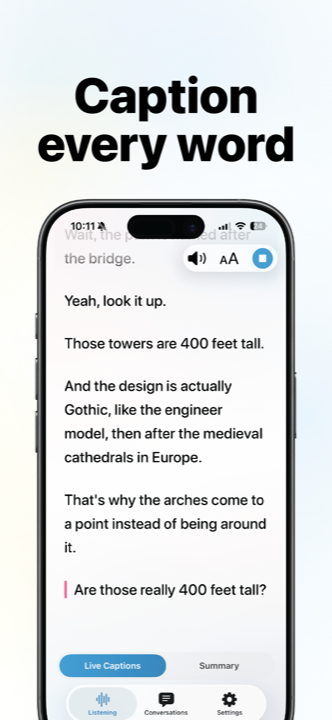
Hearing Buddy captioning a conversation in real time on iPhone
Hearing Buddy: unlimited captions, no meter running.
Price
Free — captions are unlimited at no cost. Buddy+ (optional extras) is $59.99/year.
Free captions
Unlimited captions with no meters or session caps. Buddy Mode group captions and transcript history are free too.
The honest limitation
It requires iOS 26 or later on iPhone and lives only on Apple devices (iPhone, Apple Watch, Mac, Vision Pro) — no Android or web. It can't caption phone calls (microphone apps can't access call audio), Buddy Mode is same-room only, there's no human-scribe tier for ADA-grade compliance, and it captions 8 languages — fewer than the cloud engines below.
Get Hearing Buddy free
2

Ava

Best for group conversations across platforms — and remote participants

Ava (by Transcense, Inc.) has been building for the deaf and hard-of-hearing community for a decade, and its signature feature is still the best of its kind: group sessions anyone can join by QR code — from an iPhone, an Android phone, or a web browser — with each speaker's words in their own color, including participants who aren't in the room. Organization plans add Ava Scribe, where a professional reviews captions live for meetings and classes that need compliance-grade accuracy. It captions in 16 languages and runs on iPhone, Android, the web, and desktop.

Price
Free plan available. Community is $14.99/mo or $119.99/yr; Pro and Enterprise plans are quoted by sales. (As of July 2026.)
Free captions
Yes, with limits — Ava's basic accuracy tier, with sessions capped at 40 minutes.
The honest limitation
The meter. Ava's most accurate captions are sold by the hour: Community includes 3 hours of premium captions per month, with extra hours sold as in-app top-ups, and Ava's own pricing page notes Community is "not an ADA-compliant plan." Captions are generated in the cloud, so an internet connection is required.
Full comparison: Ava vs Hearing Buddy
3

Apple Live Captions

Best for zero-install captions — including phone calls and other apps' audio

Live Captions isn't an app you download — it's built into iOS itself (Settings → Accessibility) on iPhone 11 or later, plus iPad, Apple-silicon Macs, and Apple Vision Pro. It's free, audio is processed on the device, and it does two things no microphone app can: caption the audio playing inside other apps, and caption phone and FaceTime calls. With iOS 26 it supports 17 locales, spanning English, Spanish, French, German, Japanese, Korean, Mandarin, and Cantonese variants.

Price
Free — built into iOS, iPadOS, macOS, and visionOS. There is no paid tier.
Free captions
Unlimited captioning, no caps of any kind.
The honest limitation
Nothing is kept. Captions are a live overlay with no automatic saved history — copying non-call captions is a manual step (new in iOS 26), and everything is gone once cleared. Call captions are retained for at most 1 hour after a call: the 1-minute setting blocks copying and screenshots entirely, and the 1-hour setting plays an audible "This call is being transcribed" announcement to everyone on the call.
Full comparison: Apple Live Captions vs Hearing Buddy
4

Live Transcribe by Mighty Fine Apps

Best for accuracy at a distance and in noisy rooms

One thing to clear up first: this is not Google's Live Transcribe. Google's app is Android-only and has never come to iPhone; this iOS app of the same name is made by San Francisco-based Mighty Fine Apps LLC, and its own App Store listing states it is not affiliated with Google.

On its own merits, it's a strong app. Its cloud-powered Pro mode is genuinely excellent where microphone apps usually struggle — restaurants, group tables, speakers across the room — and it covers 145+ languages. It also runs on iOS 15 or later, so it works on iPhones that many newer apps have left behind. Roughly 7,300 US ratings averaging 4.6 stars say the transcription quality is real.

“How can deaf people afford this? Many can't afford subscription??”

3-star US App Store review, June 11, 2026 — on a 4.6-star app whose users praise the accuracy but keep flagging the price
Price
Starter $9.99/mo or $80/yr (10 metered Pro hours/month), up to Unlimited at $149.99/mo or $1,600/yr. Extra Pro hours are $1.49 each. (Official plan table, updated June 29, 2026.)
Free captions
Not really — the trial is 1 hour of use spread across 3 days. After that, even the on-device Basic mode (for conversations within about 3 feet) requires a subscription.
The honest limitation
Everything meaningful is metered. The accurate Pro mode is sold by the hour, speaker colors require the Ultra mode (which burns metered cloud time), and the cost draws recurring complaints from the app's own users.
Full comparison: Live Transcribe app vs Hearing Buddy Looking for Google's Live Transcribe on iPhone? Read this first
5

Otter

Best for meetings — recorded, searchable, and shared

Otter (by Otter.ai, Inc.) is the biggest transcription brand on this list, with around 64,000 App Store ratings — and it's superb at what it's actually built for: meetings. It joins your Zoom, Teams, and Google Meet calls, identifies who said what, and files everything into a searchable cloud library you can revisit later. Some deaf and hard-of-hearing users make it work for daily life, but its DNA is note-taking for work, not accessibility.

Price
Pro is about $100/yr ($8.33/mo billed annually, or $16.99 month-to-month). (As of July 2026.)
Free captions
300 transcription minutes per month, with every conversation capped at 30 minutes.
The honest limitation
It's cloud-only, so captions falter when the connection does — and the free tier's 30-minute cap ends a family dinner mid-sentence. Worth knowing: a consolidated class action alleging Otter recorded conversations without all-party consent is pending in federal court (allegations only — a motion to dismiss was awaiting a ruling as of June 2026).
Full comparison: Otter vs Hearing Buddy
6

NALscribe

Best for completely free offline captioning

NALscribe comes from the National Acoustic Laboratories — the research division of Hearing Australia — and it shows. The app is entirely free with no ads, no subscriptions, and no usage limits, and its App Store privacy label reports that the developer collects no data at all. Its standout feature is downloadable offline language packs in 13 languages, so captions keep working with no connection, plus a thoughtful auto-erase option that clears the screen after 20 or 60 seconds for sensitive conversations. It runs on iPhone and iPad (iOS 14+), Apple-silicon Macs, and Apple Vision Pro.

Price
Free. No in-app purchases, no usage limits.
Free captions
Unlimited — including fully offline with downloaded language packs.
The honest limitation
It's deliberately bare captioning: no group mode, no alerts, no saved-transcript features. It's Apple-only — NAL's own FAQ says ongoing speech-recognition licensing fees keep it off Android — NAL notes offline mode is slightly less accurate, and the current version (1.9) hasn't been updated since March 2025.
7

BeAware

Best for free sound alerts on your wrist, with captions included

BeAware Deaf Assistant is a free community-built app (by developer Saamer Mansoor) that pairs live speech-to-text with something genuinely useful: customizable loud-sound alerts pushed to your iPhone and a paired Apple Watch by vibration, LED flash, or notification. It can also speak typed text aloud into live phone and video calls ("Play Text"), and it works fully offline. It's free with no ads and no subscription, holds 4.5 stars from about 238 US ratings, and an Android version is now on Google Play.

Price
Free — no ads, no subscription, no in-app purchases.
Free captions
Unlimited, and it works offline.
The honest limitation
The iOS app appears stale: version 1.2 hasn't been updated since December 2023 — over two and a half years as of this writing — and App Store reviewers find the transcription itself inconsistent. Best treated as a sound-alert companion rather than a primary captioning app.

Need captions for phone calls?

None of the microphone apps above can caption a phone call — apps simply can't access call audio on iPhone. Apple's built-in Live Captions can caption phone and FaceTime calls (retained for at most an hour). For dedicated, unlimited call captioning, look at the FCC-funded services: InnoCaption (Mezmo Corporation) and Rylo (formerly Nagish) caption calls free for eligible US users with hearing loss who complete the required federal registration.

How we picked (and how to read this list)

Every app here does real-time speech-to-text on an iPhone and is either built for — or widely used by — the deaf and hard-of-hearing community. For each one we verified the current price, the actual free-tier limits, and where the audio is processed, using the company's own pricing pages and help centers, App Store listings, and Apple's documentation, all checked on July 6, 2026.

One app is ours, and we've said so where it appears. We left out Google's Live Transcribe (Android-only — it doesn't run on iPhone), phone-call captioning services (a different job, covered in their own guide), and meeting-notes tools that market into accessibility searches without being built for them.

Questions & answers

It depends on the conversation. For unlimited free everyday captions processed entirely on your phone, we'd point you to Hearing Buddy — our app, bias disclosed. For groups that include Android phones or remote participants, Ava. For captioning phone calls and other apps' audio, Apple's built-in Live Captions. For accuracy at a distance or in noisy rooms, Live Transcribe by Mighty Fine Apps' cloud Pro mode. For meetings, Otter. NALscribe and BeAware are the fully free picks with no paid tiers at all.

No. Google's Live Transcribe is Android-only — it comes pre-installed on Pixel phones and Google has never released an iPhone version. The "Live Transcribe" app you'll find on the Apple App Store is an unrelated subscription app by Mighty Fine Apps LLC, and its own listing states it is not affiliated with Google. See our guide to Live Transcribe alternatives for iPhone for the full picture.

Apple Live Captions (built into iOS), NALscribe, and BeAware are entirely free with no paid tiers. Hearing Buddy's captions are free and unlimited, with an optional $59.99/year Buddy+ tier for extras like Apple Watch name alerts and conversation summaries. Ava and Otter have capped free tiers (40-minute sessions and 300 minutes per month respectively), and Live Transcribe by Mighty Fine Apps has no real free tier — just a 1-hour trial spread over 3 days.

Hearing Buddy processes everything on-device, so captions — and even live translation — work with no signal at all. Apple Live Captions also processes audio on-device. NALscribe offers downloadable offline language packs, and BeAware works fully offline. Ava, Otter, and Live Transcribe's Pro mode generate captions in the cloud, so they need an internet connection.

Mostly no. Microphone apps can't access call audio, which is why Hearing Buddy, Ava, Otter, NALscribe, and BeAware caption the room around you, not the call itself. Apple Live Captions is the exception in this list: it can caption phone and FaceTime calls, with retention capped at one hour. For dedicated call captioning, FCC-funded services like InnoCaption and Rylo (formerly Nagish) caption calls free for eligible US users who complete the required registration.

Because it's our app, and we'd rather tell you that plainly than pretend to be a neutral reviewer. What we can promise: every fact about every other app on this page was verified against official sources on July 6, 2026, each entry leads with what that app is genuinely best at, and each includes an honest limitation — including ours (iOS 26+ only, no Android, no phone-call captioning, same-room-only group mode).

Two do it well, in different ways. Ava's group sessions work across iPhone, Android, and web browsers — including remote participants — making it the broadest group tool in the category. Hearing Buddy's Buddy Mode connects iPhones in the same room directly to each other, free and with no internet needed, with each person's words attributed by name in their own color and translated into each reader's language. If your group is same-room and all-iPhone, Buddy Mode costs nothing; if it spans platforms or distance, Ava is the better fit.

Coral, your warm and supportive buddy

Captions that are just there.

Unlimited, free, and processed entirely on your iPhone — no meter, no account, no audio leaving your phone. Trying it takes about a minute.

Free on iPhone & Apple Watch · Requires iOS 26 or later

Hearing Buddy is our app; this page ranks it first and discloses that. All other apps are compared as fairly as we know how. Ava is a trademark of Transcense, Inc. Apple, iPhone, Apple Watch, FaceTime, and Live Captions are trademarks of Apple Inc. The Live Transcribe iOS app is a product of Mighty Fine Apps LLC, which is not affiliated with Google LLC — Google's separate Live Transcribe app is Android-only. Otter is a trademark of Otter.ai, Inc. NALscribe is a product of the National Acoustic Laboratories, the research division of Hearing Australia. BeAware Deaf Assistant is published by Saamer Mansoor. Notta is a trademark of Notta Inc. InnoCaption is a product of Mezmo Corporation. Rylo and Nagish are trademarks of Nagish Inc. All trademarks belong to their respective owners; Hearing Buddy is not affiliated with, sponsored by, or endorsed by any of these companies. Pricing, plan, and feature details were verified on July 6, 2026 from official pricing pages, help centers, App Store listings, and Apple documentation (Ava details verified July 1, 2026); plans change, so please confirm current details with each company. If anything here is out of date, let us know and we'll fix it.