Is Google Live Transcribe on iPhone? No. Here’s what to use instead
Google never brought its captioning app to iPhone. The good news: your iPhone already has a free option built in, and there are good alternatives beyond it.
By Lilly Seay · Updated October 6, 2026

No. Google’s Live Transcribe runs only on Android. It’s on Google Play and preinstalled on Pixel phones, and Google has never released an iPhone version (there was no Google Live Transcribe app in the US App Store when we checked on October 6, 2026). The free option already on your iPhone is Apple Live Captions: on iPhone 11 or later, go to Settings, then Accessibility, then Live Captions. If you want more than a live overlay, such as saved transcripts, group captions, or translation, the alternatives are below. The App Store apps called “Live Transcribe” are from other developers, not Google, and most of them are paid.
Before you search the App Store: two very different apps share this name
This trips up almost everyone, so let’s clear it up first. If you search “Live Transcribe” on your iPhone, the app you find is not the one your Android friends use.
Google’s Live Transcribe (Android only)
The famous one: free, developed with Gallaudet University, preinstalled on Pixel phones, distributed only through Google Play. Its full name there is “Live Transcribe & Notification.” It has never been on the iOS App Store.
“Live Transcribe” by Mighty Fine Apps (the iOS one)
A separate subscription app from Mighty Fine Apps LLC, a San Francisco company. Its own listing states it isn’t affiliated with Google. It’s a capable app (more below), but it isn’t free: a 3-day trial, then $80 to $1,600 a year. Watch for soundalikes too: “Live Transcribe +” (Zerovik) and “Live Transcribe - Speech Text” (Aleksei Metelkin) are from other unrelated developers and also sell in-app purchases. See what each one costs.
Why there’s no iPhone version — and why waiting isn’t a plan
Google hasn’t published a reason, but the pattern has held since the app launched. Three things explain it:
It’s part of Android itself
Live Transcribe isn’t really a standalone app — it ships preinstalled on Pixel and select Android phones, lives inside Android’s accessibility settings, and requires Android 8 or newer. Platform accessibility features don’t tend to move to a competitor’s platform.
Apple builds its own equivalents
On iPhone, system-level captioning comes from Apple: Live Captions and Sound Recognition are built into iOS. That leaves Google little room — and little incentive — to maintain a system-style accessibility app on a rival’s platform.
Years of silence
In all the years since launch, Google has distributed Live Transcribe only through Google Play, its support pages describe Android setups exclusively, and no iOS version has ever been announced. If you’re holding out for a port, nothing suggests one is coming.
What to use instead on iPhone
Five real options, each with its honest catch. We make one of them, which is exactly why we listed everyone else too. Start with the one already on your phone.
Apple Live Captions
Before installing anything, check what your iPhone already does. Go to Settings, tap Accessibility, tap Live Captions, and turn it on. To caption the people around you, tap the Live Captions window, then Microphone. It processes audio on your iPhone (like Hearing Buddy’s standard captions), and it’s the only option on this list that can caption phone calls, FaceTime, and audio from other apps. No microphone app can do that, ours included.
The honest catch: captions are a live overlay with no saved transcript history. You can copy them before you clear them, but nothing is kept for you. It isn’t available in every language or region, and Apple says its accuracy can vary. No group captions, no translation of captions, no name alerts. Many people use it for calls and a captioning app for everything else.
See our full Apple Live Captions comparison →Live Captions not working? Fixes →
Hearing Buddy
The closest thing to Google’s app on iPhone, and in some ways more. Standard live captions are free and unlimited, with no meters, no session caps, and no account. They’re processed on your iPhone, so they work offline, and your transcripts are saved on your phone until you delete them (Google’s app deletes them after at most 3 days).
It also does things Google’s app never had: free Caption Together rooms, where the iPhones in the same room caption a conversation together with each person’s words shown by name, and live translation into 10 reading languages (free inside Caption Together rooms). The optional Buddy+ subscription ($59.99/year, 14-day free trial) adds Apple Watch taps when someone says your name or asks you a question, Boost for quiet voices through your headphones, summaries, and solo translation. Captions themselves are never paywalled.
The honest catch: it requires iOS 26 or later, so older iPhones can’t install it. It captions 8 languages (18 regional variants), far fewer than cloud engines. And like every microphone app, it can’t caption phone calls, FaceTime, or other apps.
Download free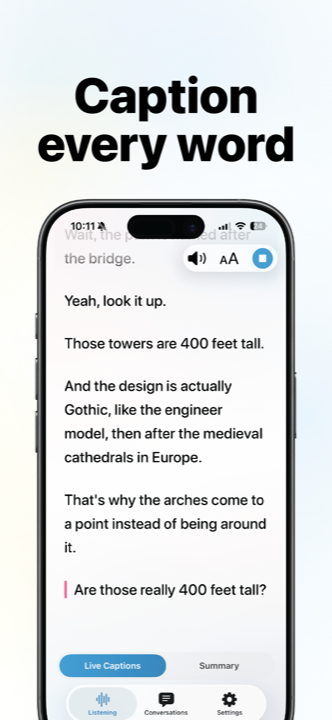
Rylo Live Transcribe
Credit where due: Rylo says its Live Transcribe feature is completely free, with no ads, no time limits, and no credit card. Rylo lists support for more than 50 languages with automatic language detection, says it works offline, and saves transcripts privately on your device. It runs on iPhone and Android, which helps if your family is mixed.
The honest catch: it lives inside Rylo’s phone-call captioning app, so in-person captions are one part of a bigger app rather than the whole point. No group captions across phones and no translation of captions are described on Rylo’s Live Transcribe page. Rylo’s call captioning is a separate, FCC-funded service for eligible US users who register.
Live Transcribe by Mighty Fine Apps
The name-twin, and credit where due: its cloud “Best” mode is genuinely excellent at a distance and in noisy rooms, color-codes different speakers, and covers 145+ languages. It supports iPhones back to iOS 15, including older phones Hearing Buddy can’t run on. It holds about 4.6 stars across roughly 7,900 US ratings.
The honest catch: the price. After the 3-day free trial, plans run from Starter ($9.99/month or $80/year, 10 Best hours a month) to Unlimited ($149.99/month or $1,600/year), with extra Best hours at $1.49 each. Every plan includes unlimited “Offline” captions, which Mighty Fine describes as meant for conversations within about 3 feet with little background noise. We didn’t find a free tier after the trial in Mighty Fine’s help center (checked October 6, 2026).
NALscribe
A genuinely admirable free option from a government hearing-research lab: no cost, no in-app purchases, no timeout, and unlimited minutes. It works online or offline, and NAL’s FAQ lists 15 language options (including four English variants) for both. If you want the simplest no-strings captioning, it delivers exactly that.
The honest catch: it’s deliberately simple. There’s no group mode, translation, or alerts, and its privacy settings can auto-erase captions after 20 or 60 seconds (turn that off to save a conversation). NAL notes online mode is slightly more accurate, and in online mode audio goes to Apple’s speech recognition servers. Its US App Store rating is modest: 3.7 stars from about 15 ratings.
Also worth knowing: BeAware Deaf Assistant (free, by Saamer Mansoor) pairs captions with sound alerts pushed to an Apple Watch, though its iOS app hasn’t been updated since December 2023.
The best live transcribe app for iPhone depends on what you need
Here’s every option above, plus the other “Live Transcribe” apps you’ll see in the App Store, with what each costs. We make Hearing Buddy, so weigh our row accordingly.
| App | Free or paid | Best for | The catch |
|---|---|---|---|
| Apple Live CaptionsApple, built into iOS | Free | Phone calls, FaceTime, and other apps' audio, with nothing to install | No saved history; not in every language or region |
| Hearing BuddyOur app | Free, unlimited captions; optional Buddy+ $59.99/yr | Everyday in-person captions with saved transcripts, free group captions, and translation | iOS 26+ only; 8 languages; can't caption calls |
| Rylo Live TranscribeNagish Inc. | Free (per Rylo: no ads, no time limits) | Free captions in 50+ languages, alongside Rylo's call captioning | One feature inside a phone-call app |
| Live TranscribeMighty Fine Apps LLC | Paid: $9.99/mo or $80/yr up to $149.99/mo or $1,600/yr, after a 3-day trial | Accuracy at a distance and in noisy rooms; older iPhones (iOS 15+) | Best-mode hours are metered on most plans |
| Live Transcribe +Zerovik Pte. Ltd. | Free download; "Full Access" in-app purchases $3.99 to $49.99 | A general transcription app if you already like it | Not built specifically for hard-of-hearing users; check what is free before relying on it |
| Live Transcribe - Speech TextAleksei Metelkin | Free download; subscriptions $4.99/week to $44.99/yr, plus minute packs | Occasional transcription | Last updated April 2025; check what is free before relying on it |
| NALscribeNational Acoustic Laboratories | Free, no in-app purchases | Simple, no-strings captions, online or offline | No group mode or translation; modest App Store rating |
Prices verified October 6, 2026 from each app’s US App Store listing, Mighty Fine Apps’ help center, Rylo’s Live Transcribe page, and Apple’s iPhone User Guide. In-app purchase lists on the App Store can include older price points. Plans change, so confirm with each developer before you pay.
What you’d get on Android vs what you can get on iPhone
These two apps never run on the same phone, so this isn’t a head-to-head — it’s context. If you’re choosing between a friend’s Android setup and your iPhone, here’s how the pieces line up.
| Feature | Google Live Transcribe on Android |  Hearing Buddy on iPhone Hearing Buddy on iPhone |
|---|---|---|
| Runs on iPhone | No — Android 8+ only Preinstalled on Pixel and select Android devices | Yes — iPhone & Apple Watch Requires iOS 26 or later |
| Price | Free | Free — unlimited captions Optional Buddy+ ($59.99/yr) adds extras; captions are never paywalled |
| Transcript history | Kept up to 3 days, then auto-deleted Saving is opt-in; just 24 hours if history is off (Google support, checked October 6, 2026) | Saved on your phone until you delete it Free — copy and share any conversation |
| Offline captioning | Depends on your device Multiple languages offline on Pixel/select Android 12+ phones; English-only on Android 8–11 | Yes, standard captions run on your iPhone Basements, flights, and dead zones all work |
| Live translation of captions | Not offered Captions appear in the language being spoken | 10 reading languages, on-device Free in Caption Together rooms; Buddy+ for your solo captions |
| Group captions across phones | Not offered One phone listens to the room | Caption Together — free iPhones in the same room connect peer-to-peer; everyone’s words appear by name in their color, no internet needed |
| Apple Watch name & question alerts | Not offered | Yes, with Buddy+ A wrist tap when someone says your name or asks you a question |
| Sound notifications (alarms, doorbells) | Yes The “& Notification” half of its Play Store name | Not offered On iPhone, Apple’s built-in Sound Recognition covers this |
| Languages | Broad multilingual coverage Among the widest of any captioning app | 8 caption languages Plus live translation into 10 reading languages, all on-device |
| Built for the deaf & HOH community | Yes Developed with Gallaudet University | Yes It’s the entire mission |
Cross-platform context, not a like-for-like matchup: Google’s Live Transcribe runs only on Android and Hearing Buddy runs only on iPhone. Google Live Transcribe details verified October 6, 2026 from Google’s own support documentation and Google Play listing. Details change, so confirm with Google before deciding.
The iPhone answer outgrew the original
For years, “Live Transcribe for iPhone” was a story about what iPhone users were missing. It isn’t anymore — there are things you can do on an iPhone today that Google’s app has never done on Android.
Captions that translate themselves
Google’s Live Transcribe captions the language being spoken — it has never translated. Hearing Buddy translates captions live into 10 reading languages (English, Spanish, French, German, Italian, Portuguese, Japanese, Korean, and both simplified and traditional Chinese), entirely on-device. In a Caption Together room it’s free, and each person reads the conversation in their own language — a bilingual family dinner where everyone follows along, no signal required.
And Caption Together itself is a shape of captioning Google’s app never attempted: instead of one phone straining to hear a whole room, everyone’s iPhone joins in, connected directly to each other — no internet, no server, no account — and each buddy’s words appear by name in their color.
A buddy on your wrist
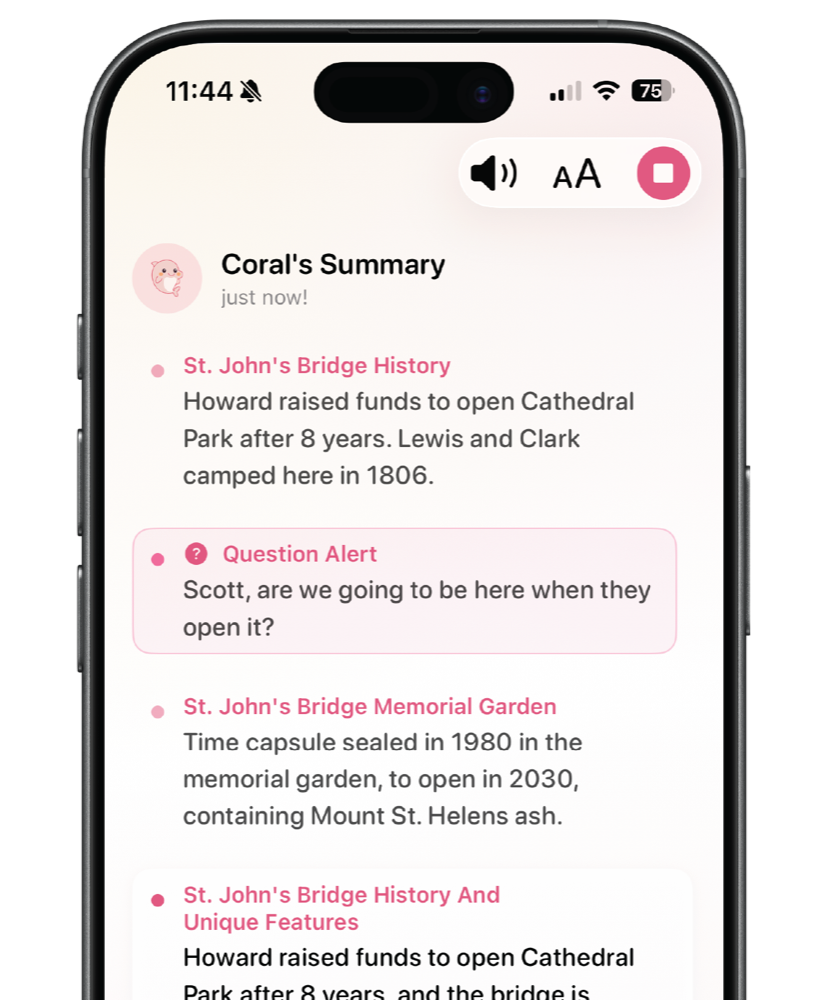
With Buddy+, your Apple Watch taps you when someone says your name or asks you a question — so you can stay present in the room instead of staring at a screen, afraid to miss the moment that mattered. Google’s app has nothing like it.
And your conversations stay yours: Google’s app auto-deletes transcripts after at most 3 days. Hearing Buddy saves them on your phone, free, until you decide otherwise — the doctor’s instructions from last month are still there when you need them.
What we’d tell you straight
We’d rather you end up with the right tool than with our app. The honest fine print:
On Android? Just use Google’s.
If you or the person you’re helping has an Android phone, Google’s Live Transcribe is free, excellent, and probably already installed. This page exists for iPhone owners — there’s no iPhone version to wait for.
Hearing Buddy needs iOS 26 or later.
Older iPhones can’t install it. On an older iPhone, Apple’s built-in Live Captions or Mighty Fine’s app (iOS 15+) are the realistic options.
No app on this page captions phone calls except Apple’s.
Mic-based apps — Hearing Buddy included — physically can’t access call audio. For calls, use Apple’s Live Captions or a dedicated call-captioning service.
Cloud engines cover more languages.
Hearing Buddy captions 8 languages. Google’s app and Mighty Fine’s 145+ language coverage go much further. If your language isn’t on our list, say so with your feet — and check back.
Caption Together is same-room only.
Group rooms connect iPhones near each other — there are no remote participants over the internet, and no Android or web joiners.
No sound notifications, no human-scribe tier.
Google’s app flags alarms and doorbells; Hearing Buddy doesn’t (Apple’s built-in Sound Recognition does that on iPhone). And if you need ADA-grade human captioning for work or school, none of the apps here replaces a professional service.
Trying the iPhone answer takes about a minute
There’s no account to create and no trial clock to race. If you came here looking for Live Transcribe, this is the fastest way to find out whether your iPhone already has you covered.
Download free
No account, no email, no credit card — the App Store is the only signup there is.
Tap the mic
Captions start right away, unlimited from the first minute, processed on your iPhone.
Bring your people
Next time the family’s around a table, have them open Caption Together — free group captions between the iPhones in the room.

Questions & answers
No. Google's Live Transcribe & Notification app is Android-only. It is distributed through Google Play and comes preinstalled on Pixel phones, and Google has never released or announced an iPhone version. When we searched the US App Store on October 6, 2026, there was no Live Transcribe app from Google LLC. The apps you will find there with "Live Transcribe" in the name come from other, unrelated developers. The closest thing Google offers on iPhone is the Transcribe mode inside Google Translate, which is built for translating a speaker into another language, not for everyday captions.
Not under that name, but iPhone has its own built-in equivalent: Live Captions. On iPhone 11 or later, go to Settings, then Accessibility, then Live Captions, and turn it on. It is free, it can caption in-person conversations through the microphone, and it can also caption audio from other apps and from phone and FaceTime calls. Apple notes that it is not available in every language, country, or region.
Google's Live Transcribe is free, but it only runs on Android. On iPhone, the free options are Apple Live Captions (built in), Hearing Buddy (standard live captions are free and unlimited, no account needed), Rylo's Live Transcribe feature (Rylo says it is free with no ads or time limits), and NALscribe (free, from Australia's National Acoustic Laboratories). The App Store app actually named "Live Transcribe," by Mighty Fine Apps, is not free after its 3-day trial.
It depends which Live Transcribe you mean. Google's Android app is free. On iPhone, Live Transcribe by Mighty Fine Apps offers a 3-day free trial, then plans of $9.99 a month or $80 a year (Starter, 10 "Best" hours a month), $29.99 a month or $325 a year (Plus, 20 hours), $74.99 a month or $810 a year (Premium, 50 hours), and $149.99 a month or $1,600 a year (Unlimited). Extra Best hours are $1.49 each, and every plan includes unlimited Offline captions. Those are the prices on Mighty Fine's own help center as of October 6, 2026.
Several unrelated apps use the name. The best known is Live Transcribe by Mighty Fine Apps LLC, a San Francisco company whose listing says it is not affiliated with Google. It holds about 4.6 stars from roughly 7,900 US ratings, its cloud "Best" mode is genuinely accurate in noise, and it costs $80 to $1,600 a year after a 3-day trial. "Live Transcribe +" by Zerovik Pte. Ltd. and "Live Transcribe - Speech Text" by Aleksei Metelkin are free downloads with in-app purchases: the US App Store lists "Full Access" options from $3.99 to $49.99 for Live Transcribe +, and subscriptions from $4.99 a week to $44.99 a year (plus minute packs) for Live Transcribe - Speech Text. Prices checked October 6, 2026. None of them is made by Google.
Start with Apple Live Captions, because it is already on your phone and it is the only option that captions phone calls and other apps. If you want saved transcripts, free group captions, or live translation, Hearing Buddy is our pick (it is our app, bias disclosed): standard captions are free, unlimited, and processed on your iPhone. Rylo's Live Transcribe is a strong free choice if you also want Rylo's call captioning. If you need the highest accuracy at a distance and are willing to pay, Mighty Fine's Live Transcribe "Best" mode is excellent.
Google has never said why. Live Transcribe ships as part of Android itself: it is preinstalled on Pixel phones, lives in Android's accessibility settings, and is distributed only through Google Play. Apple builds its own equivalents into iOS (Live Captions and Sound Recognition), so there is little room for a system-level rival. Google's support pages describe Android setups only, and no iOS version has been announced.
Only briefly. Per Google's support documentation (checked October 6, 2026), transcription history is kept for up to 3 days and then deleted automatically, or after 24 hours if history is turned off. Hearing Buddy saves transcripts on your iPhone, free, until you delete them.
Yes. Hearing Buddy's standard captions are processed on your iPhone, so they work in basements, on flights, and in dead zones. Rylo says its Live Transcribe works offline too, and NALscribe has an offline mode. For comparison, Google's Android app offers multiple offline languages only on Pixel and Android 12+ phones, while select phones on Android 8 to 11 can download English only.
No. Google's app also flags household sounds like alarms and doorbells (on iPhone, Apple's built-in Sound Recognition covers that), and it captions far more languages than Hearing Buddy's 8. Hearing Buddy also does things Google's app does not: live translation of captions into 10 reading languages, free Caption Together group captions between iPhones in the same room, and transcripts that stay on your phone. With the optional Buddy+ subscription, your Apple Watch taps you when someone says your name or asks a question.
Keep exploring
Live Transcribe App vs Hearing Buddy
The full head-to-head with Mighty Fine’s iOS app, including its complete plan table
Best Live Captioning Apps for iPhone
Every real option in 2026, compared fairly in one place
Apple Live Captions vs Hearing Buddy
What your iPhone’s built-in captions do well — and what they can’t
Stop searching. Start reading the room.
Unlimited free captions, saved transcripts, group rooms, live translation, and a buddy on your wrist. No account and no meter on standard captions.
Free on iPhone & Apple Watch · Requires iOS 26 or later
Live Transcribe is a trademark of Google LLC; Google’s Live Transcribe app is available only for Android. This page also references “Live Transcribe,” the separate iOS app published by Mighty Fine Apps LLC (whose own listing notes it is not affiliated with Google); “Live Transcribe +” by Zerovik Pte. Ltd.; “Live Transcribe - Speech Text” by Aleksei Metelkin; Rylo, a trademark of Nagish Inc.; Google Translate, a trademark of Google LLC; Live Captions and Sound Recognition, features of iOS from Apple Inc.; NALscribe, published by the National Acoustic Laboratories, the research division of Hearing Australia; and BeAware Deaf Assistant by Saamer Mansoor. All trademarks are the property of their respective owners. Hearing Buddy is independently made and is not affiliated with, sponsored by, or endorsed by Google LLC, Mighty Fine Apps LLC, Zerovik Pte. Ltd., Nagish Inc., Apple Inc., the National Acoustic Laboratories, or any other company named here. All facts on this page, including Google’s transcript-retention and offline-support details and all pricing, were verified on October 6, 2026 against each company’s own published documentation and app store listings. Things change; if something here is out of date, tell us and we’ll fix it. This page reflects our honest assessment, and yes, we tell you when another app is the better choice.