Apple Live Captions vs Hearing Buddy
An honest review of the free captions built into your iPhone: what they do well, their limits, the languages they support, and what to try when they stop working. Plus how Hearing Buddy fits alongside them.
By Lilly Seay · Updated October 6, 2026

Live Captions is a genuinely good, free accessibility feature. It captions phone calls, FaceTime, and any app's audio with nothing to install, which Hearing Buddy can't do. Its limits are about memory and the room: in-person captions aren't saved anywhere, call captions clear within an hour at most, and it shows one stream of text on one device. Hearing Buddy is built around in-person conversation: saved transcripts, free group captions between iPhones in the same room, translation, and, with Buddy+, Boost for quiet voices and a tap on your Apple Watch when someone says your name. Both process audio on your device, and both caption the same 18 locales. Most people who love one still keep the other.
Choose Hearing Buddy if…
- You want a saved transcript of every conversation, so you can scroll back, copy, and share it days later
- Your conversations are in person: Caption Together captions everyone at the table across iPhones, free, with no internet needed
- You want captions translated live into 10 reading languages
- You want Boost: with Buddy+, Buddy boosts quiet voices through your headphones in real time
- You want a wrist tap when someone says your name or asks you a question
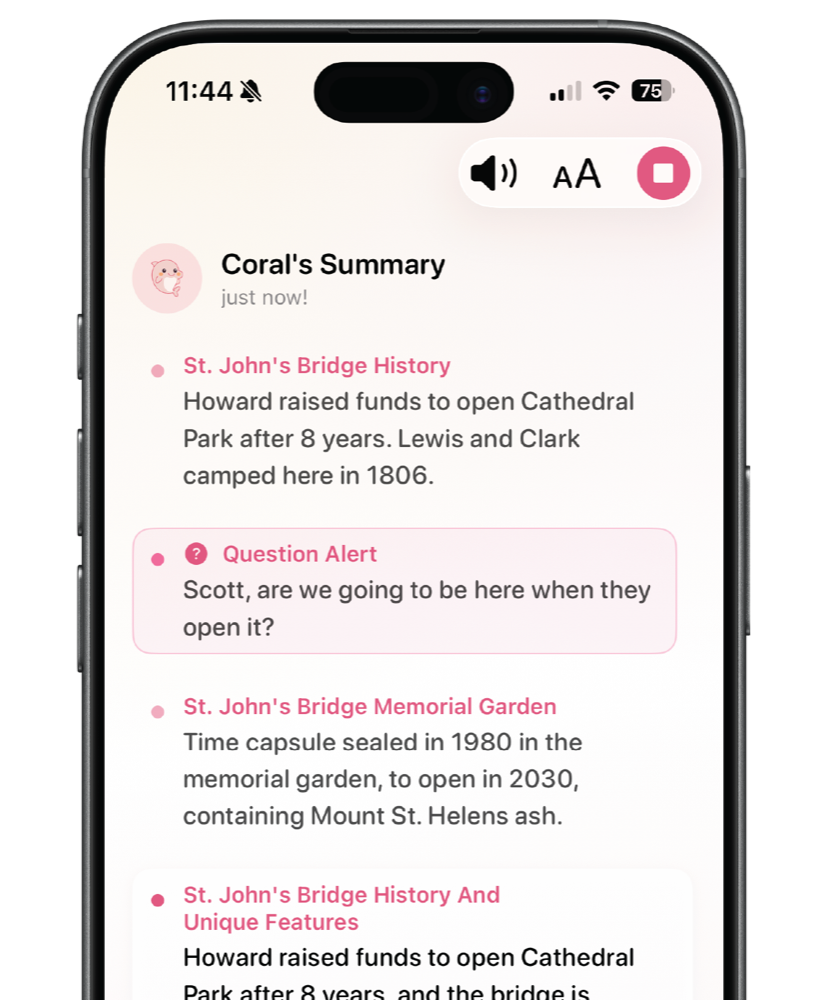
- You join conversations late and want Buddy to catch you up with a summary
Choose Apple Live Captions if…
- You need captions for phone or FaceTime calls. Live Captions does this; microphone apps like Hearing Buddy can't access call audio
- You want captions for other apps' audio: videos, podcasts, voice notes, anything your device plays
- Your iPhone can't run iOS 26. Live Captions works on iPhone 11 or later, back to iOS 16
- You want captions built into your iPad, Apple silicon Mac, or Apple Vision Pro as well
- You want zero setup: it's already in Settings, completely free, one toggle away
Side by side
| Feature |  Hearing Buddy Hearing Buddy | Apple Live Captions |
|---|---|---|
| Free to use | Unlimited free captions No meters or session caps on standard captions; Buddy+ extras are optional | Free, built into iOS Nothing to install. A Settings toggle, no paid tier at all |
| Where your audio is processed | On your iPhone Standard captions are processed on-device | On-device too Apple: "Audio is processed on device." A genuine tie on privacy |
| Caption languages | 18 locales The same 18 locales Apple lists for Live Captions | 18 locales English, Spanish, French, German, Japanese, Korean, Mandarin, and Cantonese variants (iOS 27) |
| Saved transcript history | Every conversation, free Saved on your phone. Copy and share any of it, anytime | No automatic history The overlay hides when audio stops; a manual Copy Captions button exists, but nothing survives Clear All |
| Captions phone & FaceTime calls | Not possible Microphone apps can't access call audio. This is Live Captions' home turf | Yes Call captions are kept 1 minute or up to 1 hour after the call, then cleared; the 1 hour option plays a transcription announcement to everyone on the call |
| Captions other apps' audio | Mic audio only Hearing Buddy captions the room, not your phone's internal audio | Yes, system-wide Videos, podcasts, voice messages, any app's sound |
| Group conversations on multiple phones | Caption Together, free iPhones in the same room connect directly; everyone's words in one timeline, shown by name in their color, no internet required | Not offered One overlay on one device |
| Live translation | Into 10 reading languages Free inside Caption Together; part of Buddy+ for solo captions | Separate feature Live Captions transcribes only. Apple's Live Translation in Phone, FaceTime, Messages, and with AirPods is a separate Apple Intelligence feature |
| Hear quiet voices better | Boost, with Buddy+ Buddy boosts quiet voices through your headphones in real time, alongside captions | Live Listen (separate feature) Streams your iPhone's microphone to AirPods or MFi hearing devices |
| Apple Watch | Name & question taps, with Buddy+ A tap on your wrist when someone says your name or asks you something | Caption mirroring View Live Captions of what your iPhone hears on a paired Watch during Live Listen. Reading, not alerts |
| Conversation summaries | Yes, with Buddy+ Buddy catches you up when you join mid-conversation | Not offered |
| Devices & OS support | iPhone, Watch, Mac & Vision Pro All Apple; iPhone requires iOS 26 or later | iPhone 11 or later, back to iOS 16 Also on supported iPads, Apple silicon Macs, and Apple Vision Pro |
Live Captions details verified October 6, 2026 from Apple's iPhone, Mac, and Apple Watch user guides and Apple's iOS and iPadOS 27 Feature Availability page. iOS updates change these details, so always confirm against Apple's current documentation.
Our Honest Review, and What Separates Them
Apple Live Captions review: what it does well, and its limits
What it does well: Live Captions is free, already on your iPhone, and captions almost anything. Tap Microphone to caption the people around you, or iPhone Audio to caption a video, podcast, or voice message. It captions phone and FaceTime calls right on the call screen, which no microphone app can do. You can move the caption window, make it full screen, change the text size and color, and copy what it captured. Audio is processed on device, so your conversations stay on your phone. Hearing Buddy is the same on that point: privacy is a tie.
Its limits, in Apple's own documentation: it needs iPhone 11 or later. It "isn't available in all languages, countries, or regions." Apple says its accuracy "may vary and shouldn't be relied upon in high-risk or emergency situations." The caption window hides itself when no audio is detected. There is no transcript history: Copy Captions and Clear All are manual, and nothing is saved for later. Call captions are kept for 1 minute (no copying or screenshots) or up to 1 hour after a call, and the 1 hour setting announces "This call is being transcribed" to everyone on the call. And it shows one stream of text from one device, with no way to tell who said what.
Our verdict: for calls and anything playing on your phone, Live Captions is the right tool and costs nothing. For in-person conversations you want to keep, share with a group, or have flagged on your wrist, that is where Hearing Buddy adds something.
Supported languages: the same 18 on both
As of iOS and iPadOS 27, Apple lists 18 locales for Live Captions: English (United States, United Kingdom, Canada, Australia, India, Singapore), Spanish (United States, Mexico, Spain), French (France, Canada), German, Japanese, Korean, Mandarin Chinese (China mainland, Taiwan), and Cantonese (China mainland, Hong Kong). Verified October 2026 on Apple's Feature Availability page.
Hearing Buddy captions those same 18 locales, so neither app wins on caption languages. The difference is translation. Live Captions shows you what it hears, in the language spoken. Hearing Buddy can translate captions live into 10 reading languages (English, Spanish, French, German, Italian, Portuguese, Japanese, Korean, and Simplified or Traditional Chinese). Translation is free inside Caption Together, and part of Buddy+ for solo captions. Apple does offer a separate Live Translation feature in Phone, FaceTime, Messages, and with AirPods on Apple Intelligence devices.
Live Captions not working?
Most of the time it comes down to a few things. Check that your iPhone is an iPhone 11 or later and that your language and region are on Apple's supported list. The first time you turn Live Captions on, it downloads language data, so it needs an internet connection once. If the window disappears, it may simply have hidden itself because no audio was detected; tap the Live Captions button to bring it back, and make sure Microphone (not iPhone Audio) is selected for in-person conversations. If you can't copy call captions, that's by design unless Keep Call Captions was set to 1 Hour before the call.
Our full step-by-step guide is linked under Keep exploring below: "iPhone Live Captions Not Working? How to Fix It."
Captions that outlive the moment
Live Captions is designed as a live overlay, not a record. The Copy Captions button is genuinely useful for pasting into Notes or Messages, but nothing is saved automatically, and once cleared, it's gone.
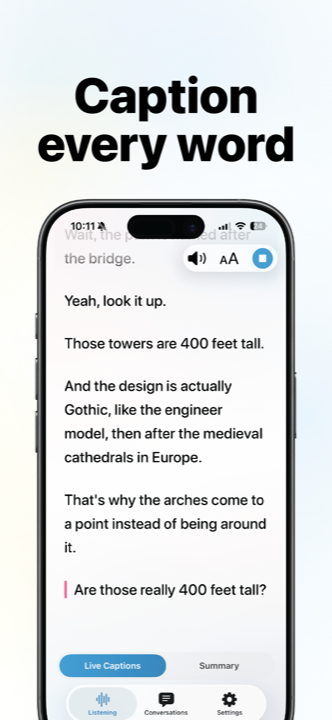
Hearing Buddy treats the transcript as the whole point. Every conversation is saved on your phone, free. You can scroll back through the doctor's appointment on the drive home, copy the address someone rattled off, or share what was decided with someone who missed it. Background listening keeps captions running while you glance at another app.
One overlay vs the whole table
Live Captions captions one stream of audio on one device. That is perfect for a video or a call, but at a group dinner every voice lands in the same unattributed wall of text.
Caption Together is free group captioning between iPhones in the same room: everyone opens Hearing Buddy, joins the people nearby, and each person's words merge into one caption timeline, shown by name in their own buddy color. The phones connect directly to each other, with no accounts and no servers, and it keeps working with no internet at all.
Boost, and a Watch that taps you
Apple's Watch story is mirroring: during a Live Listen session, you can view Live Captions of what your iPhone hears on a paired Apple Watch. That's reading text on a smaller screen.
Hearing Buddy's Watch feature works the other way around: with Buddy+, your wrist taps you when someone says your name or asks you a question, so you can stay present in the room and trust that you'll be flagged when you're needed.
Buddy+ ($59.99 a year, with a 14-day free trial) also adds Boost, where Buddy boosts quiet voices through your headphones in real time, and conversation summaries for an easy catch-up when you join late. The captions themselves stay free either way.
When Apple Live Captions Is the Better Choice
Live Captions is a thoughtfully built accessibility feature, and for some jobs it's simply the right tool, sometimes the only one. We'd rather you know exactly when:
The sound is coming from your phone
Phone calls, FaceTime, videos, podcasts, voice messages. Live Captions captions your device's own audio system-wide. Microphone apps like Hearing Buddy can't access call audio, so for captioned calls, Live Captions (or a dedicated call-captioning service) is the answer.
Your device can't run iOS 26, or isn't an iPhone
Live Captions reaches back to iOS 16 on iPhone 11 or later, and also runs on supported iPads, Apple silicon Macs, and Apple Vision Pro. Hearing Buddy requires iOS 26 on iPhone. If your device can't update that far, Live Captions is the built-in option that already works.
You want captions right now, with zero setup
There's nothing to download from the App Store: Settings, Accessibility, Live Captions, toggle on. The first enable downloads language data, which needs an internet connection once. For instant, no-commitment captions, built-in wins.
You want captions on more than one Apple device
Live Captions is the same feature across iPhone, iPad, Mac, and Vision Pro, so captions follow you to whatever screen you're using for video calls and media.
What You'll Actually Pay
- Unlimited real-time captions, free
- Caption Together group captions, free
- Background listening & transcript history, free
- Buddy+: $59.99/year with a 14-day free trial
- Buddy+ adds Boost, Watch taps, summaries, and solo translation
- Included with iOS, iPadOS, macOS, and visionOS
- No subscription, no in-app purchases, nothing to install
- One-time language download needs an internet connection
- Call captions are kept 1 minute or up to 1 hour, never longer
- Requires iPhone 11 or later
Details checked October 6, 2026 against Apple's support guides. Both are free. This comparison is about what each one does, not what it costs.
Trying Hearing Buddy takes about a minute
This isn't an either/or. Live Captions stays right where it is in Settings. Most people simply add Hearing Buddy alongside it.
Download free
No account, no email, no credit card. The App Store is the only signup there is.
Tap the mic
Captions start instantly, and this time they're saved.
Keep Live Captions on
Use it for calls, FaceTime, and app audio, and Hearing Buddy for the conversations happening around you. They cover each other's gaps.

Questions & answers
Yes, for what it's built to do. It is free, needs no download, processes audio on device, and captions phone calls, FaceTime, app audio, and the conversation around you. Its limits: no saved transcript history, call captions that clear within an hour at most, a window that hides when no audio is detected, one unattributed stream of text, and, in Apple's words, accuracy that "shouldn't be relied upon in high-risk or emergency situations." Many people use it for calls and media and add an app like Hearing Buddy for in-person conversations.
The usual causes: (1) Live Captions requires iPhone 11 or later. (2) Your language, country, or region needs to be supported. (3) The first time you turn it on (Settings > Accessibility > Live Captions), your iPhone downloads language data, which needs an internet connection. (4) The caption window hides itself when no audio is detected, which can look like it stopped working. (5) For in-person conversations, make sure Microphone is selected rather than iPhone Audio. And if you can't copy or screenshot call captions, that's by design unless Keep Call Captions was set to 1 Hour before the call. Our full troubleshooting guide is at hearingbuddyapp.com/learn/iphone-live-captions-not-working.
As of iOS and iPadOS 27, Apple lists 18 locales: English (US, UK, Canada, Australia, India, Singapore), Spanish (US, Mexico, Spain), French (France, Canada), German, Japanese, Korean, Mandarin Chinese (China mainland, Taiwan), and Cantonese (China mainland, Hong Kong). Live Captions transcribes but doesn't translate. Hearing Buddy captions the same 18 locales and can translate captions live into 10 reading languages. Verified October 2026.
Apple's documentation describes no time limit on captioning itself. The limits are on keeping what was captioned: there is no automatic history, and call captions are kept for 1 minute during a call (cleared when it ends) or up to 1 hour after a call, depending on your Keep Call Captions setting. Hearing Buddy's standard captions are also unlimited, and every conversation is saved on your phone.
There's no automatic way. You can tap Copy Captions and paste them into Notes or Messages, but anything cleared is gone. Call captions are stricter: with Keep Call Captions set to 1 Minute, copying and screenshots are blocked and everything clears when the call ends; the 1 Hour setting allows copying for an hour afterward and plays a "This call is being transcribed" announcement to everyone on the call. If you want conversations saved automatically, Hearing Buddy saves every session on your phone, free.
Yes, phone calls and FaceTime, right on the call screen. Hearing Buddy can't do that: microphone apps have no access to call audio. The captions are temporary, kept for at most one hour after the call. For everyday captioned calling with a saved record, dedicated call-captioning services are also worth a look.
Completely. It's a built-in accessibility feature of iOS, iPadOS, macOS, and visionOS, with no purchase, no subscription, and no app to install. Hearing Buddy's live captions are also free and unlimited; its optional Buddy+ tier ($59.99/year, 14-day free trial) adds Boost, Apple Watch taps, conversation summaries, and solo translation.
No, and we won't pretend otherwise. Apple states that Live Captions audio "is processed on device," and Hearing Buddy's standard captions are processed on your iPhone too. On privacy, this one is a tie. The differences are elsewhere: what gets captioned, what gets kept, and what happens when more than one person is talking.
Yes, in a specific way: during a Live Listen session, you can view Live Captions of what your iPhone hears on a paired Apple Watch. Hearing Buddy's Watch feature is different: instead of showing you everything, Buddy+ taps your wrist when someone says your name or asks you a question, so you can stay engaged in the room.
Honestly: both. They barely overlap. Live Captions is the right tool for phone calls, FaceTime, and your phone's own audio, which Hearing Buddy can't touch. Hearing Buddy is built for the conversations happening around you: saved transcripts, free Caption Together group captions across iPhones, translation, and with Buddy+, Boost, Watch taps, and summaries.
Captions shouldn't disappear.
Live Captions shows you the words. Hearing Buddy keeps them: saved, shareable, translated, with a tap on your wrist when you're needed. Free, no account, no strings.
Available on iPhone, Apple Watch, Mac & Vision Pro
Apple, iPhone, iPad, Mac, Apple Watch, Apple Vision Pro, AirPods, FaceTime, Live Listen, and Live Captions are trademarks of Apple Inc. Hearing Buddy is an independent app and is not affiliated with, sponsored by, or endorsed by Apple Inc. All Live Captions details on this page were verified on October 6, 2026 from Apple's support documentation and feature-availability pages; iOS updates change these details, so please confirm with Apple's current documentation. This page reflects our honest assessment, and yes, we tell you when Live Captions is the better choice.