Otter vs Hearing Buddy
Otter takes notes in your meetings. Hearing Buddy captions the rest of your life. An honest side-by-side for the deaf and hard-of-hearing community — so you can pick the one that fits, or keep both.
By Lilly Seay · Updated July 6, 2026

Otter is a meeting notetaker — one of the best ever made — and Hearing Buddy is your ears. Otter joins your video calls, files searchable notes, and names who said what; in exchange, its free plan meters you to 300 minutes a month in 30-minute pieces, and everything runs through the cloud. Hearing Buddy captions the rest of your life — unlimited, free, and processed entirely on your iPhone, so it works even where the Wi-Fi doesn't. Pick by where you lose the most words.
Choose Hearing Buddy if…
- You want unlimited captions — no 300-minute monthly meter, no 30-minute conversation cutoffs
- You need captions for daily life — the pharmacy counter, the dinner table, the doctor's office — not just scheduled meetings
- Privacy matters: captions are processed entirely on your iPhone, never uploaded, and keep working with no internet at all
- Your group is in the room with you, on iPhones — Caption Together captions everyone together, free, no internet needed
- You want a wrist tap on Apple Watch when someone says your name or asks you a question
- You have an iPhone on iOS 26 or later
Choose Otter if…
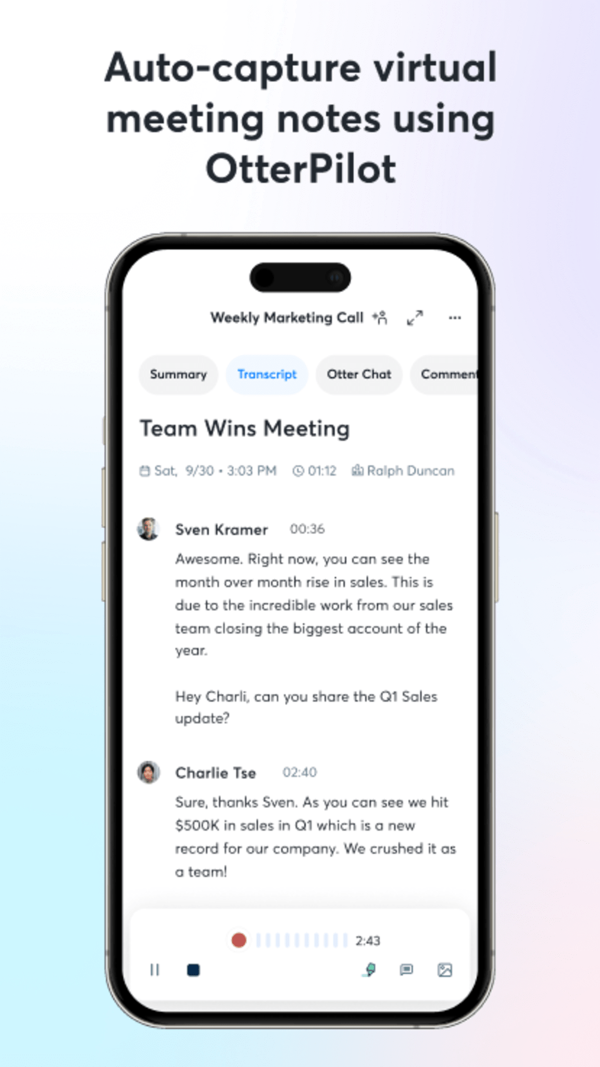
- Your main captioning need is scheduled meetings — OtterPilot joins Zoom, Google Meet, and Microsoft Teams and takes notes for you
- You want a searchable cloud library of every conversation, shareable with teammates across devices
- You need speakers tagged by name in your meeting transcripts
- You're on Android, or need captions in a browser or on your computer
- Your iPhone can't run iOS 26 — Otter supports older devices
Side by side
| Feature |  Hearing Buddy Hearing Buddy | Otter |
|---|---|---|
| Free live captions | Unlimited, no meter Caption all day, every day — no monthly minutes, no session caps | 300 minutes per month Each conversation also cut off at 30 minutes on the free plan |
| Where your audio is processed | 100% on your iPhone Audio never leaves your device | Cloud servers Transcripts are generated remotely; internet required |
| Works offline | Yes Basements, flights, hospital rooms, weak Wi-Fi — captions keep working | No Captioning depends on your connection |
| Built for the deaf & HOH community | Yes It's the entire mission | Built for meetings Plenty of deaf and hard-of-hearing people use Otter well — but it's designed as a workplace notetaker |
| Apple Watch name & question alerts | Yes, with Buddy+ A tap on your wrist when someone says your name or asks you something | Not offered |
| Conversation summaries | Yes, with Buddy+ Your Buddy catches you up when you join mid-conversation | Yes — meeting summaries Automated summaries with action items after meetings; genuinely useful |
| Group conversations on multiple phones | Caption Together — free Nearby iPhones connect directly; everyone's words merge into one timeline, attributed by name in their color — no internet required | One phone records the room In-person conversations are captured from a single device and processed in the cloud |
| Joins your video meetings | Not offered | OtterPilot Auto-joins Zoom, Google Meet, and Microsoft Teams and takes notes for you |
| Names who's speaking | Colors, not names Speaker Labels (Buddy+) tell up to four voices apart in solo sessions — no voice training, nothing stored, resets every session | Named speakers Tags who said what by name in meeting transcripts |
| Searchable transcript library | On your phone only History is free and private, with copy and share — but there's no cloud workspace or team sharing | Cloud workspace Search every conversation, share with your team, sync across devices |
| Platforms | iPhone, Watch, Mac & Vision Pro All-Apple; iPhone requires iOS 26 or later | iPhone, Android, web Plus a Chrome extension — follows you across nearly any device |
| Cost of the full experience | Free captions; Buddy+ $59.99/yr Captions are free either way — Buddy+ only adds extras | Pro ~$100/yr — still metered 1,200 minutes/month and 90 minutes per conversation on Pro |
Otter details verified from otter.ai/pricing and the Otter App Store listing on July 6, 2026. Plans and limits change — always confirm current details with Otter directly.
What Actually Separates Them
A meter is the wrong shape for ears
Otter's free Basic plan gives you 300 transcription minutes a month — about 10 minutes a day — and cuts every conversation off at 30 minutes (as of July 6, 2026). For sampling a meeting notetaker, that's reasonable. For your ears, it's a countdown: one long doctor's appointment can hit the per-conversation cap mid-sentence, and a couple of family dinners can spend the month's meter. Upgrading to Pro (about $100/year) raises the meter to 1,200 minutes and 90-minute conversations — but it's still a meter.
Hearing Buddy starts from the opposite premise: captions are your ears, so they're unlimited and free. No monthly minutes, no per-conversation clock, no top-ups. The paid tier (Buddy+, $59.99/year) adds extras like Apple Watch alerts and summaries — it never unlocks the captions themselves.
Captions that don't depend on the Wi-Fi
Otter transcribes in the cloud — that's what powers its meeting bots, cross-device sync, and searchable library. It also means your conversations travel to Otter's servers, and captioning depends on your connection. Public-radio station WHYY told the story of a hard-of-hearing woman whose captions failed at her doctor's office because the Wi-Fi was too weak — with a cloud captioner, the room decides whether you get to follow the conversation.
Cloud recording carries legal weight, too: Otter is currently facing a consolidated class action alleging that its meeting assistant recorded conversations without everyone's consent. Otter is contesting the case — a motion to dismiss is pending, and no court has ruled on the merits — but the question the suit raises is the right one to ask of any captioning tool: where does the audio go?
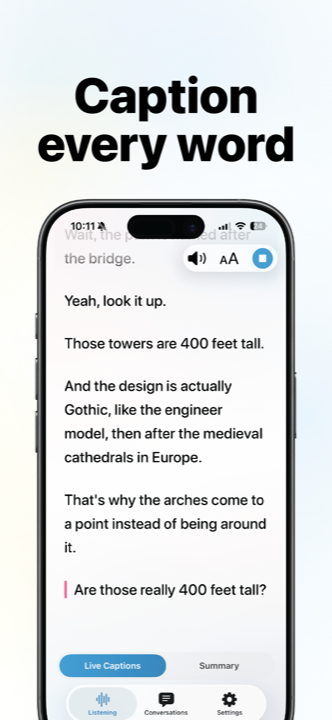
Hearing Buddy's answer is architectural. Everything is processed on your iPhone: no audio ever leaves your device, and captions keep working with no signal at all — basements, flights, and that exam room with the weak Wi-Fi. Even live translation runs on the phone, in 10 reading languages, so a bilingual conversation doesn't need a connection either.
Built for the dinner table, not the conference room
Otter's home turf is the conference room: OtterPilot joins your Zoom, Google Meet, and Microsoft Teams calls, and meetings come back as summaries and action items filed in a searchable workspace. It's genuinely excellent at that job — and it's a job Hearing Buddy doesn't do at all.
Hearing Buddy's home turf is everywhere else. Caption Together is free group captioning between iPhones in the same room: everyone opens the app, joins the people nearby, and each person's words appear in one timeline, attributed by name in their own buddy color. The phones connect directly to each other — no account, no server, no internet needed — and each buddy can read the room in their own language, translated on their own phone.
For one-phone conversations, Buddy+ adds Speaker Labels: colors that tell up to four voices apart, with no voice training and nothing stored — labels reset when the session ends. It's not Otter's named-speaker meeting transcript, and it isn't trying to be; it's just enough to follow who's talking at the table.
A tap on the wrist
This one is simply unique: with Buddy+, your Apple Watch taps you when someone says your name or asks you a question — so you can stay present in the room instead of staring at a screen waiting not to miss something. No other app in the category offers it.
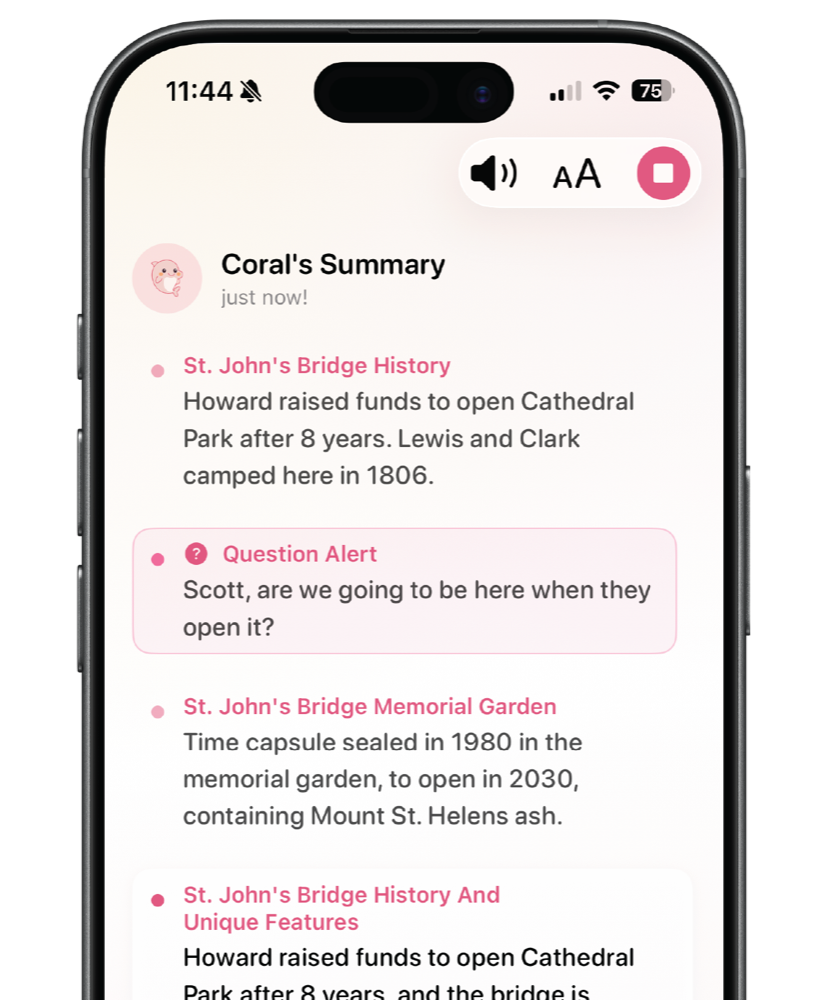
Buddy+ also adds conversation summaries (your Buddy catches you up on what a conversation is about and its mood), Speaker Labels, translation for solo sessions, and Live Activity support — $59.99 a year, about 40% less than Otter Pro, on top of captions that were never metered in the first place.
When Otter Is the Better Choice
We'd rather you end up with the right tool than with our app. Otter is the biggest name in transcription for a reason — 4.8 stars across roughly 64,000 App Store ratings — and there are real situations where it's the better pick:
Meetings are the main event
OtterPilot joins your Zoom, Google Meet, and Microsoft Teams calls automatically, takes notes while you participate, and files summaries with action items. Hearing Buddy doesn't join video meetings at all. If your hardest listening happens in scheduled meetings, Otter was built for exactly that.
You need one searchable record
Otter keeps every conversation in a cloud workspace you can search, share with teammates, and open from any device. Hearing Buddy's transcripts live privately on your phone — great for privacy, but there's no team library and no cross-device search.
You want named speakers in your transcripts
Otter tags who said what by name in meeting transcripts. Hearing Buddy's Speaker Labels use colors, not names — up to four voices, solo sessions only, resetting each session. For minutes and follow-ups where names matter, Otter's transcript is the more useful document.
You're not all-Apple — or your iPhone is older
Otter runs on iPhone, Android, and the web, with a Chrome extension. Hearing Buddy lives on iPhone, Apple Watch, Mac, and Vision Pro, and requires iOS 26 or later on iPhone — if your phone can't update that far, Otter's free tier works today.
What You'll Actually Pay
- Unlimited real-time captions — free
- Caption Together group captions — free
- Background listening & transcript history — free
- Buddy+: $59.99/year
- Buddy+ adds Watch alerts, summaries, Speaker Labels, solo translation, and Buddy personalities
- Basic (free): 300 transcription minutes/month, 30-minute cap per conversation
- Basic file imports: 3 audio or video files, lifetime
- Pro: $8.33/user/mo billed annually (~$100/yr), or $16.99 month-to-month
- Pro is still metered: 1,200 minutes/month, 90 minutes per conversation
- Business: $19.99/user/mo billed annually
Prices checked July 6, 2026 on otter.ai/pricing and both apps' App Store listings. Otter's web and App Store prices can differ by a few cents. If anything here has changed, let us know and we'll fix it.
Trying Hearing Buddy takes about a minute
There's nothing to migrate, nothing to cancel, and no account to create. Most people simply try it alongside whatever they use today.
Download free
No account, no email, no credit card — the App Store is the only signup there is.
Tap the mic
Captions start instantly. No onboarding maze, no calibration.
Keep what works
Plenty of people keep Otter for work meetings and use Hearing Buddy for everything else. That's a fine answer too.

Questions & answers
Otter has a free Basic plan, but it's metered: 300 transcription minutes per month, with each conversation cut off at 30 minutes, plus 3 audio or video file imports over the lifetime of the account (as of July 6, 2026). That works out to about 10 minutes of captions a day. Hearing Buddy's captions are unlimited and free, with no monthly meter and no session caps.
As of July 6, 2026, Otter Pro costs $8.33 per user per month billed annually — about $100 a year — or $16.99 month-to-month. Pro raises the meter to 1,200 minutes per month with a 90-minute cap per conversation. Otter Business is $19.99 per user per month billed annually. Hearing Buddy's captions are free with no meter at all; the optional Buddy+ tier costs $59.99/year.
Many deaf and hard-of-hearing people use Otter, especially for work meetings — it's a polished, widely loved tool with about 64,000 App Store ratings averaging 4.8 stars. But it's designed as a meeting notetaker, and daily life runs into its shape: the free plan meters you to 300 minutes a month and 30 minutes per conversation, and captions need an internet connection to work. Hearing Buddy is built specifically for the deaf and hard-of-hearing community: unlimited free captions, processed entirely on your iPhone, with Apple Watch name and question alerts.
No. Otter generates transcripts on cloud servers, so it needs a working internet connection — on weak Wi-Fi or in a dead zone, captions stall. Hearing Buddy processes everything on your iPhone, so captions work with no signal at all: basements, flights, hospital rooms, rural dead zones.
In August 2025, lawsuits were filed alleging that Otter's meeting assistant recorded conversations without the consent of everyone in them. The suits were consolidated into a single class action in federal court in California. As of July 6, 2026, Otter is contesting the case: a motion to dismiss is awaiting a ruling, no class has been certified, and no court has ruled on the merits — so these remain allegations. We mention it because consent and privacy are real questions in this category. Hearing Buddy answers them architecturally: audio is processed on your iPhone and never leaves it, and Caption Together connects phones directly with no server in between.
Yes. Real-time captions, Caption Together group captions, background listening, transcript history, and copy/share are free with no minute meters or session limits. The optional Buddy+ upgrade ($59.99/year) adds Apple Watch name and question alerts, conversation summaries, Speaker Labels, translation for solo sessions, Live Activity support, and Buddy personality choices — but the captions themselves are never paywalled.
Not the way Otter does. Hearing Buddy has no meeting bot — it won't join your Zoom calls or file notes into a cloud workspace. What it does offer is conversation summaries with Buddy+: your Buddy catches you up on what an in-person conversation is about and its mood, and everything stays on your phone. If automated notes for video meetings are the job, Otter is the right tool for it.
Not at all. A common setup in the hard-of-hearing community is Otter for scheduled work meetings — where its meeting bot, summaries, and searchable library shine — and Hearing Buddy for everything in between: unlimited free captions at the pharmacy counter, the dinner table, and the drive home. Both are free to try.
Captions for your whole life, not just your meetings.
Unlimited captions, no meter, no account, no audio leaving your phone. See what it feels like when captions are just… there.
Available on iPhone, Apple Watch, Mac & Vision Pro
Otter is a trademark of Otter.ai, Inc. Hearing Buddy is independently made and is not affiliated with, sponsored by, or endorsed by Otter.ai, Inc. All Otter pricing, plan, and feature details on this page were verified on July 6, 2026 from otter.ai and the Otter App Store listing; plans change, so please confirm current details with Otter. The lawsuit described on this page is a set of allegations that Otter is contesting; no court has ruled on the merits as of July 6, 2026. This page reflects our honest assessment — and yes, we tell you when Otter is the better choice.