Ava vs Hearing Buddy
Two captioning apps built for the deaf and hard-of-hearing community — compared honestly, so you can pick the one that fits your life (or keep both).
By Lilly Seay · Updated July 1, 2026

Both apps caption group conversations — Ava across any platform and any distance, Hearing Buddy between iPhones in the same room with no cloud in between. The bigger difference is the meter: Ava's most accurate captions are sold by the hour, while Hearing Buddy's captions are unlimited and free, processed entirely on your iPhone, with a tap on your Apple Watch when someone says your name. Pick by how you'll actually use it.
Choose Hearing Buddy if…
- You want unlimited captions with no minute meters or session limits
- Privacy matters — captions are processed entirely on your iPhone, so your audio is never uploaded
- Your group is in the room with you, on iPhones — Caption Together shares your captions with the whole table, free, no internet needed
- You want a wrist tap on Apple Watch when someone says your name or asks you a question
- You'd rather pay once a year ($59.99) for the extras than $14.99 every month
- You have an iPhone on iOS 26 or later
Choose Ava if…
- Your groups include remote participants, Android phones, or web joiners — Ava's cloud sessions cover all of that; Caption Together is same-room, iPhone-to-iPhone
- You're on Android or Windows — Hearing Buddy is all-Apple
- Your school or workplace needs professionally reviewed captions (Ava's Scribe, on organization plans)
- You caption in a language Hearing Buddy doesn't support yet — Ava covers 16 caption languages
- Your iPhone can't run iOS 26 — Ava supports older devices
Side by side
| Feature |  Hearing Buddy Hearing Buddy | Ava |
|---|---|---|
| Free live captions | Unlimited, full quality No session limits — caption all day, every day | Basic accuracy tier Sessions capped at 40 minutes on the free plan |
| Premium caption hours | Never metered Captions are the whole point — they're not paywalled | 3 hours/month on Community $14.99/mo; extra premium hours sold as in-app top-ups |
| Where your audio is processed | 100% on your iPhone Audio never leaves your device | Cloud servers Captions are generated remotely; internet required |
| Works offline | Yes Basements, airplanes, spotty rural signal — captions keep working | No Needs a connection to caption |
| Transcript history | Saved on your phone, free Copy and share any conversation | Cloud-synced Saved transcripts stored on Ava's servers when you choose to keep them |
| Apple Watch name & question alerts | Yes, with Buddy+ A tap on your wrist when someone says your name or asks you something | Not offered |
| Conversation summaries | Yes, with Buddy+ Your Buddy catches you up when you join mid-conversation | Not offered |
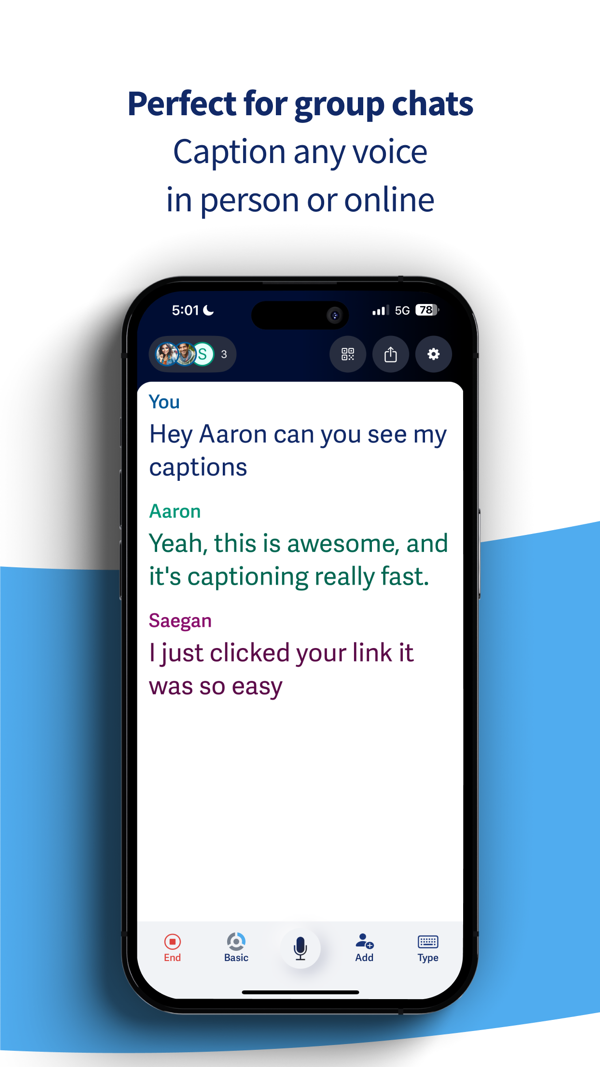
| Group conversations on multiple phones | Caption Together — free iPhones in the same room connect directly; everyone's words merge into one timeline, no internet required | Yes — cross-platform Join by QR code from iPhone, Android, or a web browser — including people who aren't in the room |
| Tells voices apart on one phone | Speaker Labels, with Buddy+ Colors tell up to four voices apart — no voice training, nothing stored, resets every session | In group sessions Speakers are distinguished by which phone or device they join from |
| Live translation | 10 languages, on-device Free inside Caption Together; part of Buddy+ for solo sessions — works offline | 16 languages Translated in the cloud as part of Ava's caption service |
| Human-reviewed captions | Not offered | Ava Scribe On organization plans, for meetings and classes that need it |
| Platforms | iPhone, Watch, Mac & Vision Pro All-Apple; iPhone requires iOS 26 or later | iPhone, Android, web, desktop Broadest platform coverage in the category |
| Built for the deaf & HOH community | Yes It's the entire mission | Yes A decade of accessibility work — real respect for that |
| Cost of the full experience | Free captions; Buddy+ $59.99/yr Captions are free either way — Buddy+ only adds extras | Community $119.99/yr — still metered Unlimited premium captions require an organization plan (quoted by sales) |
Ava details verified from ava.me/pricing and the Ava App Store listing on July 1, 2026. Plans and limits change — always confirm current details with Ava directly.
What Actually Separates Them
The meter is the real difference
Ava's free plan gives you its basic accuracy tier with sessions capped at 40 minutes — fine for a short chat, tough for a family dinner. The Community plan ($14.99/month) includes 3 hours of premium-accuracy captions per month, with extra hours sold as in-app top-ups, and Ava's own pricing page notes that Community is "not an ADA-compliant plan." Unlimited premium captions are reserved for organization plans quoted by sales.
Hearing Buddy takes the opposite view: captions are the whole point, so they're unlimited and free. No session clock, no monthly hour allowance, no top-ups. The paid tier (Buddy+, $59.99/year) adds extras like Apple Watch alerts and summaries — it never unlocks the captions themselves.
Where your conversations go
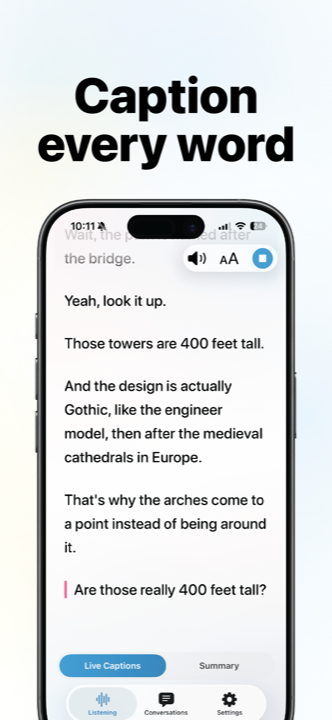
Ava generates captions on cloud servers, which is how it powers group sessions and many languages — but it means your audio travels to the internet, and captioning stops when your connection does. Ava encrypts its broadcasts and doesn't sell data, and saved transcripts sync through its cloud.
Hearing Buddy processes everything on your iPhone. Your doctor's appointment, your therapy session, your family argument — the audio never leaves your device. That also means captions work with no signal at all: basements, flights, dead zones.
Even translation stays on the phone: captions can be translated live into any of 10 reading languages using language packs that run entirely on your iPhone — so a bilingual family dinner doesn't need a signal either.
Group captions, no cloud required
Caption Together is free group captioning between iPhones in the same room: everyone opens Hearing Buddy, joins the people nearby, and each person's words merge into one caption timeline, attributed by name in their own buddy color. The phones connect directly to each other — no accounts, no servers, and it keeps working where there's no internet at all. And because translation happens on each phone, everyone can read the same dinner conversation in their own language.
Ava's group sessions are still the broader tool: people can join from Android phones or a web browser, and remote participants can join over the internet — Caption Together is same-room only. But if your table is all-iPhone, the family-dinner feature no longer requires a subscription.
For one-phone conversations, Buddy+ adds Speaker Labels: colors that tell up to four voices apart without training anyone's voice. Nothing is recorded or stored — labels reset when the session ends.
A tap on the wrist
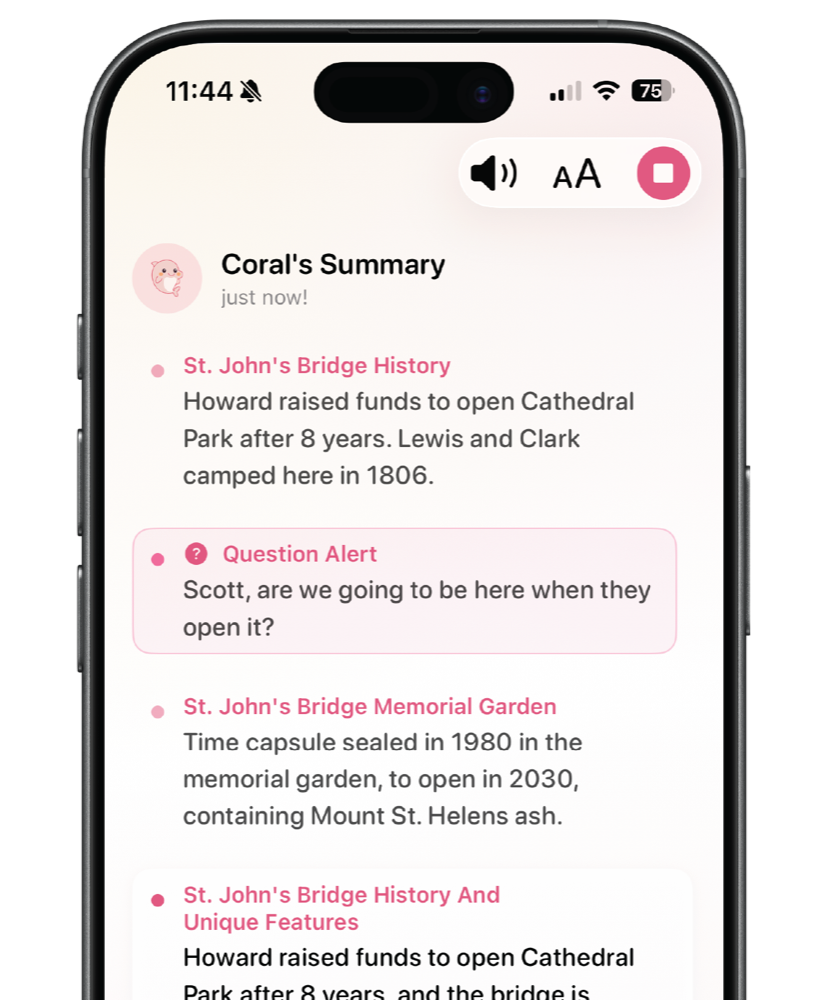
This one is simply unique: with Buddy+, your Apple Watch taps you when someone says your name or asks you a question — so you can stay present in the room instead of staring at a screen waiting not to miss something. No other captioning app offers it.
Buddy+ also adds conversation summaries (your Buddy catches you up on what a conversation is about and its mood), Speaker Labels, translation for solo sessions, and Live Activity support, for $59.99 a year — half of Ava's Community annual price.
When Ava Is the Better Choice
We'd rather you end up with the right tool than with our app. Ava has been doing accessibility work for a decade, and there are real situations where it's the better pick:
Your groups span platforms — or distance
Ava's group sessions — where everyone joins by QR code and each speaker gets a color — work from iPhones, Android phones, and web browsers alike, including participants who aren't in the room, and they're battle-tested in classrooms and offices. Caption Together only connects iPhones that are physically together. If your meetings are hybrid or include Android users, Ava is the tool for the job.
You need compliance-grade accuracy
Ava's organization plans add Scribe, where a professional reviews the captions live. For legally mandated accommodations at work or school, that human layer matters, and we don't offer one.
You're not all-Apple
Ava runs on Android, the web, Mac, and Windows. Hearing Buddy lives on Apple devices: iPhone, Apple Watch, Mac, and Vision Pro. If your life includes Android or Windows, Ava follows you there.
You need many languages or an older iPhone
Ava captions in 16 languages; Hearing Buddy currently captions 8 (with live translation into 10). And Ava supports older devices — Hearing Buddy requires iOS 26 or later, so if your iPhone can't update that far, Ava's free tier is a solid place to start.
What You'll Actually Pay
- Unlimited real-time captions — free
- Caption Together group captions — free
- Background listening & transcript history — free
- Buddy+: $59.99/year
- Buddy+ adds Watch alerts, summaries, Speaker Labels, solo translation, and Buddy personalities
- Free: basic accuracy, 40-minute session cap
- Community: $14.99/mo or $119.99/yr
- Community includes 3 hrs/month of premium captions
- Extra premium hours sold as in-app top-ups
- Pro & Enterprise (unlimited premium, Scribe): quoted by sales
Prices checked July 1, 2026 on ava.me/pricing and both apps' App Store listings. If anything here has changed, let us know and we'll fix it.
Trying Hearing Buddy takes about a minute
There's nothing to migrate, nothing to cancel, and no account to create. Most people simply try it alongside whatever they use today.
Download free
No account, no email, no credit card — the App Store is the only signup there is.
Tap the mic
Captions start instantly. No onboarding maze, no calibration.
Keep what works
Plenty of people keep Ava for group meetings and use Hearing Buddy for everything else. That's a fine answer too.

Questions & answers
Ava has a free plan, but it uses Ava's basic accuracy tier and caps every session at 40 minutes (as of July 2026). Higher-accuracy "premium" captions are metered: the $14.99/month Community plan includes 3 hours per month, with extra hours sold as in-app top-ups. Hearing Buddy's captions are unlimited and free, with no session caps.
As of July 2026, Ava Community costs $14.99/month or $119.99/year and includes 3 hours of premium captions per month. Unlimited premium captions and the human-reviewed Scribe service require Pro or Enterprise organization plans, which are quoted by Ava's sales team. Hearing Buddy's optional Buddy+ tier costs $59.99/year.
Yes. Real-time captions, Caption Together group captions, background listening, transcript history, and copy/share are free with no minute meters or session limits. The optional Buddy+ upgrade ($59.99/year) adds Apple Watch name and question alerts, conversation summaries, Speaker Labels, translation for solo sessions, Live Activity support, and Buddy personality choices — but the captions themselves are never paywalled.
Hearing Buddy processes all audio on your iPhone — your audio is never uploaded anywhere, and captions work fully offline. Even Caption Together group sessions connect iPhones directly to each other rather than through a server. Ava generates captions on cloud servers, which is what enables its cross-platform group features; Ava encrypts its broadcasts and says it doesn't sell user data, but your audio does leave the device and an internet connection is required.
Yes, when the group is in the same room. Caption Together connects nearby iPhones into one captioned conversation, free: everyone opens Hearing Buddy, joins the buddies around them, and the captions merge into a single timeline with each person's words shown by name in their own color. The phones connect directly to each other, so it works even without internet. Ava's group sessions are still the better fit when your group includes remote participants, Android phones, or people joining from a web browser.
Yes. Hearing Buddy translates captions live into 10 languages — English, Spanish, French, German, Italian, Portuguese, Japanese, Korean, and Simplified or Traditional Chinese — using language packs that run entirely on your iPhone, so translation works offline and your conversations still never leave the device. Inside Caption Together, translation is free and each person reads the conversation in their own language; translating your solo captions is part of Buddy+. One current exception: Cantonese captions can't be translated yet. Ava translates between 16 languages through its cloud service.
No. Hearing Buddy is built for Apple devices — iPhone, Apple Watch, Mac, and Vision Pro — and requires iOS 26 or later on iPhone. Ava runs on iPhone, Android, the web, and desktop — if you need captions on Android or Windows, Ava is the better fit.
Not at all. A common setup in the hard-of-hearing community is using a group tool like Ava for work meetings or classes, and Hearing Buddy for daily life — where unlimited free captions, offline support, and Watch alerts matter most. Both are free to try.
Every word matters, and so do you.
Unlimited captions, no meter, no account, no strings. See what it feels like when captions are just… there.
Available on iPhone, Apple Watch, Mac & Vision Pro
Ava is a trademark of Transcense, Inc. Hearing Buddy is independently made and is not affiliated with, sponsored by, or endorsed by Transcense, Inc. All Ava pricing, plan, and feature details on this page were verified on July 1, 2026 from ava.me and the Ava App Store listing; plans change, so please confirm current details with Ava. This page reflects our honest assessment — and yes, we tell you when Ava is the better choice.