Rylo vs Hearing Buddy
Rylo, formerly Nagish, is a free FCC-certified app that captions your phone calls, something Hearing Buddy can't do. Here is what Rylo is, whether it's safe, what reviewers say, and where Hearing Buddy fits.
By Lilly Seay · Updated October 6, 2026

Rylo (the app formerly called Nagish) is a legitimate, FCC-certified phone call captioning app, free for eligible US users with hearing loss because a federal fund pays for the captions. In exchange, federal rules require a registration that includes your address, date of birth, and the last four digits of your SSN. Hearing Buddy does a different job: it captions the conversations happening around you, in person, with no signup. If phone calls are your struggle, get Rylo. If the room is, get Hearing Buddy. Plenty of people carry both.
Choose Hearing Buddy if…
- In-person conversations are where you struggle most. Captioning the room is Hearing Buddy's entire job
- You don't want to register anywhere: no account, no address, no SSN digits. Captions start right after download
- You're outside the United States. Rylo supports the US and its territories; Hearing Buddy works in any country
- Your group is in the room: Caption Together captions everyone on their own iPhones, free, with each person's words shown by name
- You want Boost: with Buddy+, Buddy boosts quiet voices through your headphones in real time
- You want a tap on your Apple Watch when someone says your name or asks you a question
Choose Rylo if…
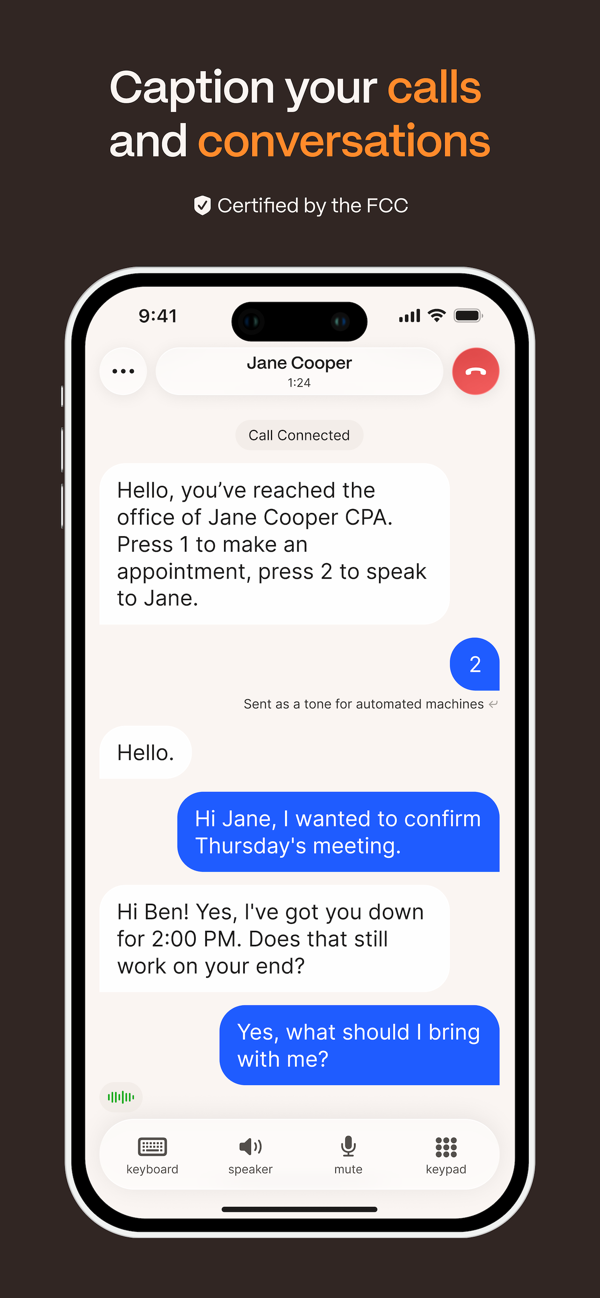
- Phone calls are the problem. Rylo captions them live, and microphone apps like Hearing Buddy can't access call audio at all
- You'd rather type your side of a call and have it spoken aloud in a voice you choose
- You want call tools built around the captions: visual voicemail, spam filtering and call blocking, and saved call transcripts
- You qualify for the FCC-funded service and don't mind a one-time federal registration
- You're on Android, or your iPhone can't run iOS 26. Rylo supports both
Side by side
| Feature |  Hearing Buddy Hearing Buddy | Rylo |
|---|---|---|
| Phone-call captioning | Not possible Microphone apps can't access call audio. This is Rylo's home turf, and we're glad it exists | Its main purpose FCC-certified live captions on incoming and outgoing calls, using your own phone number |
| In-person conversation captions | The entire app Unlimited and free, no session caps, transcripts saved on your phone | Rylo Live Transcribe Free with no time limits per Rylo, works offline, 50+ languages, transcripts saved to your device |
| Registration to caption | No signup at all No account, no email. The App Store download is the only step | FCC registration for calls Name, home address (for 911), date of birth, last 4 SSN digits, and a hearing-loss self-certification. Required by federal rules, not Rylo's choice |
| Who can use it free | Everyone, anywhere No eligibility requirements or country restrictions | Eligible US users US and its territories, for people who are deaf, hard of hearing, or have a speech disability; a federal fund pays Rylo per caption minute |
| Group conversations on multiple phones | Caption Together, free iPhones in the same room connect directly; everyone's words merge into one timeline, no internet required | Not offered |
| Boost quiet voices in headphones | Boost, with Buddy+ Buddy boosts quiet voices through your headphones in real time | Not offered |
| Apple Watch name & question taps | Yes, with Buddy+ A tap on your wrist when someone says your name or asks you something | Not listed Rylo's App Store listing shows an Apple Watch app; name and question taps aren't among its listed features |
| Type replies that are spoken aloud | Not offered Hearing Buddy captions the room. It doesn't speak for you | Yes, on calls Choose a voice and type. Rylo speaks your words to the other caller |
| Languages | 18 caption locales; translation into 10 Translation is free inside Caption Together; part of Buddy+ for solo captions | 6 for calls; 50+ for Live Transcribe Calls: English, Spanish, French, Japanese, Hebrew, and Italian |
| Platforms & requirements | iPhone, Watch, Mac & Vision Pro All Apple; iPhone requires iOS 26 or later | iPhone and Android iPhone requires iOS 16.6 or later; Android via Google Play |
| Built for the deaf & HOH community | Yes Co-founded by Lilly Seay, who is hard of hearing | Yes Its App Store listing says it was built for the Deaf community, by the Deaf community. Real respect for that |
Rylo details verified October 6, 2026 from rylo.com, help.rylo.com, the Rylo App Store listing, and FCC.gov. Rylo changes quickly, so always confirm current information with Rylo directly.
What Rylo Is, and What Separates the Two
What is the Rylo app?
Rylo is a free phone call captioning app for people who are deaf, hard of hearing, or have a speech disability. Until June 9, 2026 it was called Nagish. On that date the company announced the new name, an $85 million funding round, and a rebuilt app it calls Rylo Phone. The App Store listing is now "Rylo: Live Call Captioning," still sold by Nagish Inc. Existing Nagish accounts, phone numbers, and call history carried over. If you are searching for "Rylo phone," "Rylo calling app," or "Rylo vs Nagish," they are all the same app.
What it does: Rylo works like your regular phone app, using your own phone number. When someone talks on a call, the words appear on screen live. You can type your replies and have them spoken aloud, and you get visual voicemail, spam filtering and call blocking, a personal dictionary, and saved call transcripts. A built-in feature called Rylo Live Transcribe also captions in-person conversations. It is available for iPhone (iOS 16.6 or later) and Android.
What it doesn't do: Rylo's free calling service covers the United States and its territories only, per its help center. Call captions are offered in six languages. It doesn't caption group conversations across several phones, boost voices through your headphones, or tap your wrist when someone says your name.
Is Rylo free? Yes, with no paid tier. Rylo is an FCC-certified provider of IP captioned telephone service (IP CTS) and IP Relay. The FCC's Telecommunications Relay Service Fund pays providers for each minute of captions, so eligible users never pay. That is also why federal law prohibits anyone but registered users with hearing loss from using captioned calls with captions turned on.
Is Rylo safe and legit? Yes, it is a real, regulated service. The FCC granted Nagish, Inc. full five-year certification for IP CTS and IP Relay on June 9, 2026 (expires June 9, 2031). Registration asks for your name, home address (used for 911), date of birth, the last four digits of your SSN, and a hearing-loss self-certification. Those are FCC rules every captioned-call provider follows, and the FCC says its user database discards the SSN details after verification. Rylo's privacy policy (rylo.com/legal/privacy, updated May 29, 2026) says it does not retain the audio or transcripts of connected calls in the ordinary course, and that captions are deleted from its servers once delivered to your device. It also shares call records with the FCC and the fund administrator, as the program requires. Its App Store privacy label lists contact info, coarse location, and a user ID as linked to you, with email and phone number used for its own marketing. Verified October 6, 2026.
What Rylo reviewers love, and what they complain about
Rylo is well loved: 4.6 stars from about 3,900 US App Store ratings as of October 6, 2026. The praise is mostly about calls finally being possible again. "This app has made a huge difference in my ability to understand a conversation and I've only used it briefly," wrote a five-star reviewer on September 30, 2026. Another liked that there is no second number to manage: "This one uses your phone number" (five stars, October 3, 2026).
The complaints in recent reviews cluster around a few themes. Accuracy: "The captioning is often inaccurate so it is difficult to understand and respond to what is really being said" (three stars, September 1, 2026). Spam calls getting through. The registration itself: "Must Social Security Number?" (one star, September 27, 2026). And leaving the app: "I did delete it, but I am now unable to receive calls" (one star, September 9, 2026). If you try Rylo and decide it isn't for you, contact Rylo support before deleting the app so your calls route normally again.
None of that changes the big picture. If phone calls are where you struggle, Rylo is a strong, free option, and Hearing Buddy cannot do that job at all.
Calls are their job; the room is ours
Here's the honest part: Hearing Buddy cannot caption phone calls. iPhone apps that listen through the microphone have no access to call audio, so no mic-based captioning app can caption your calls. If calls are the hard part, Rylo is the right tool.
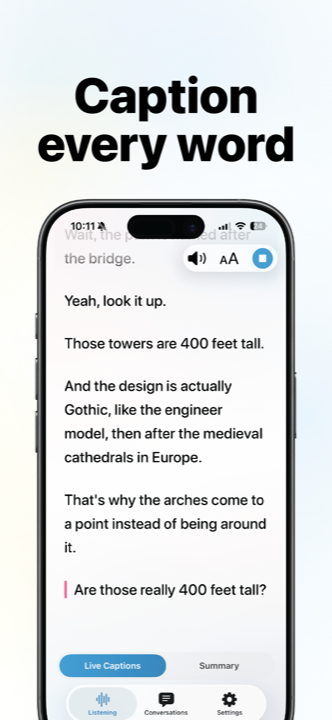
Hearing Buddy owns the other side of the day: every conversation that isn't a phone call. Rylo Live Transcribe is a good free companion to Rylo's calling. For Hearing Buddy, the room is the whole product: unlimited free captions with no signup, background listening, transcript history, Caption Together for groups, and a Buddy that taps your wrist when someone says your name.
What "free" asks of you first
Both apps are free, so the difference is what each one asks before it starts. Rylo's calls are paid for by a federal fund, and the federal rules that come with the money mean registration: name, home address kept current for 911, date of birth, the last four digits of your SSN, and an electronic self-certification of hearing loss. Rylo's help center explains each requirement, and every FCC-funded captioned-call service works the same way.
Hearing Buddy asks for none of it, because it never touches the phone network. No account, no address, no eligibility test, no country limits. Anyone, anywhere, can download it and start captioning the room in seconds.
The in-person job, built out completely
Caption Together captions a whole group, free: iPhones in the same room connect directly to each other, with no internet, no server, and no account. Each person's words appear by name in their own color, and everyone can read the room in their own language.
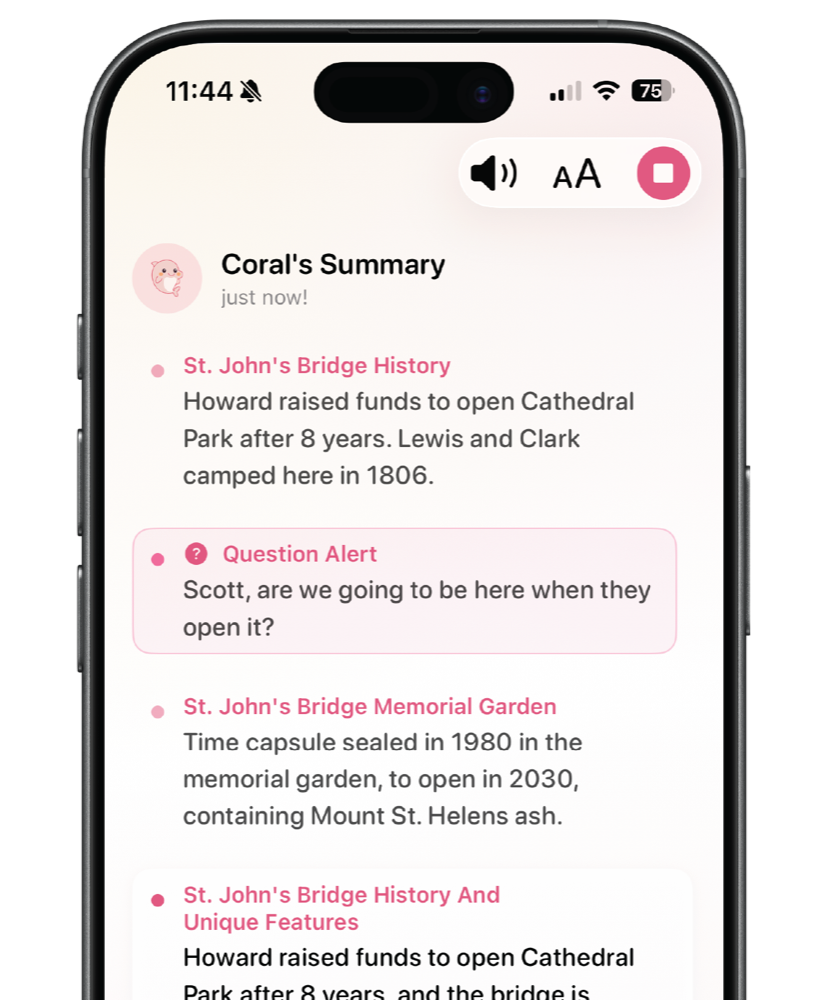
Buddy+ ($59.99/year, with a 14-day free trial) adds the extras. Buddy boosts quiet voices through your headphones in real time. Buddy taps your Apple Watch when someone says your name or asks you a question. Buddy summarizes conversations for an easy catch-up. And live translation works for solo captions too. Standard captions are processed on your iPhone and stay free either way.
When Rylo Is the Better Choice
We mean it when we call this comparison complementary. Rylo does the one thing microphone apps can't, and it does it well. Choose Rylo when:
A phone call is the problem
Doctor's offices, insurance lines, your grandkids. Rylo captions the actual call, live, and no mic-based app can. If calls are your daily struggle, download Rylo before you download us.
You'd rather type than speak
On Rylo calls you can type your side and have it spoken aloud in a voice you choose, with a personal dictionary for names and phrases. Hearing Buddy captions what others say. It doesn't speak for you.
You want the full call toolkit
Visual voicemail, spam filtering and call blocking, saved call transcripts, and call captions in six languages (English, Spanish, French, Japanese, Hebrew, and Italian). Rylo built the whole phone experience around captions.
You're on Android or an older iPhone
Rylo ships for Android too, and its iPhone app runs on iOS 16.6 or later, while Hearing Buddy requires iOS 26. If your phone can't run that, Rylo Live Transcribe is a good free fallback for in-person moments as well.
What You'll Actually Pay
- Unlimited real-time captions, free
- Caption Together group captions, free
- Background listening & transcript history, free
- No registration, no eligibility rules, any country
- Buddy+: $59.99/year with a 14-day free trial. Adds Boost, Watch taps, summaries, and solo translation
- App download: $0, no subscriptions or in-app purchases
- Captioned calls: free for eligible US users who are deaf, hard of hearing, or have a speech disability
- Paid for by the FCC's Telecommunications Relay Service Fund, per minute of captions
- Requires FCC registration: name, address, date of birth, last 4 SSN digits, and a hearing-loss self-certification
- Supports the US and its territories
Details checked October 6, 2026 on rylo.com, help.rylo.com, FCC.gov, and both apps' App Store listings. Both apps are free to start. This comparison is about what each one does, not what it costs.
Trying Hearing Buddy takes about a minute
There's nothing to migrate and nothing to cancel, and if you use Rylo, you don't have to stop. Most people simply add Hearing Buddy alongside it.
Download free
No account, no forms, no attestation. The App Store is the only signup there is.
Tap the mic
Captions start instantly, in any country, with or without internet.
Keep Rylo for calls
Seriously. If captioned calls help you, keep them. Hearing Buddy covers everything in between.

Questions & answers
Rylo is used to caption phone calls for people who are deaf, hard of hearing, or have a speech disability. It works like your regular phone app with your own number: the other person's words appear on screen live, and you can type replies that are spoken aloud. It also includes visual voicemail, spam filtering, saved call transcripts, and Rylo Live Transcribe for in-person conversations. It is free for eligible US users. Note that "Rylo" is also the name of an unrelated 360 camera made by a company VSCO acquired in 2019.
Yes. Nagish renamed itself Rylo on June 9, 2026, alongside an $85 million funding round. Same company (Nagish Inc., doing business as Rylo), same App Store listing, now called "Rylo: Live Call Captioning." Rylo calls the rebuilt calling app Rylo Phone. Existing Nagish accounts, phone numbers, and call history moved over automatically.
Yes. Rylo is a regulated, FCC-certified provider: the FCC granted Nagish, Inc. full certification for IP captioned telephone service and IP Relay on June 9, 2026, through June 9, 2031. The sensitive details it asks for (address, date of birth, last four SSN digits) are required by FCC rules for every captioned-call provider, and the FCC says its user database discards SSN details after verification. Rylo's privacy policy says it doesn't retain call audio or transcripts in the ordinary course and deletes captions from its servers once they reach your phone. As with any app, read the privacy policy at rylo.com/legal/privacy before you sign up. Verified October 6, 2026.
Yes, there is no paid tier. Captioned telephone service in the US is paid for by the FCC's Telecommunications Relay Service Fund, which reimburses Rylo for each minute of captions, so eligible users never pay. The trade-off is federal registration. Hearing Buddy is also free, with unlimited captions and no registration of any kind, but it captions the room, not phone calls.
Yes. "Rylo: Live Call Captioning" is on the App Store and requires iOS 16.6 or later; there is also an Android version. Rylo Phone is the company's name for the rebuilt calling app that replaced the Nagish app in June 2026. It is the same download.
Because federal rules for captioned telephone service require it. Per Rylo's help center, the last four SSN digits and date of birth verify your identity and prevent fraud in the federally funded program, and your registered address is used to locate you if you call 911. If you don't have an SSN, the FCC says providers can accept other ID such as a driver's license or passport. Hearing Buddy never asks for any of this because it doesn't touch the phone network.
No. iPhone apps that listen through the microphone have no access to call audio, so Hearing Buddy can't caption calls. That's a platform limit, not a missing feature. If captioned phone calls are what you need, Rylo is built exactly for that. Hearing Buddy covers everything outside the call: in-person conversations, unlimited and free.
Yes. Rylo Live Transcribe captions in-person conversations, and Rylo says it is free with no time limits, works offline, and supports more than 50 languages. Hearing Buddy is built entirely around the in-person job and adds things Rylo doesn't offer: free Caption Together group captions across iPhones in the same room, and with Buddy+, Boost for quiet voices in your headphones, Apple Watch taps when someone says your name or asks a question, and conversation summaries.
Rylo's help center says it currently supports the United States and its territories (Puerto Rico, Guam, American Samoa, the U.S. Virgin Islands, and the Northern Mariana Islands), with plans to expand. Hearing Buddy has no eligibility rules or country restrictions and works the same in any country.
A lot of people honestly should have both. They barely overlap. Rylo captions your phone calls, which Hearing Buddy can't do. Hearing Buddy captions your life between the calls, with no registration, and adds Caption Together group captions, Boost, and Apple Watch taps. Both are free to download and try.
Rylo has the calls. Your Buddy has the rest.
Unlimited in-person captions with no registration and no eligibility forms. See what it feels like when captions are just there.
Available on iPhone, Apple Watch, Mac & Vision Pro
Rylo and Nagish are trademarks of Nagish Inc. Hearing Buddy is independently made and is not affiliated with, sponsored by, or endorsed by Nagish Inc. or the FCC. All Rylo details on this page were verified on October 6, 2026 from rylo.com, help.rylo.com, the Rylo App Store listing, and FCC.gov; details change, so please confirm current information with Rylo directly. Review excerpts are quoted verbatim from the US App Store and dated. This page reflects our honest assessment, including the part where Rylo does something we can't.