InnoCaption vs Hearing Buddy
One captions your phone calls, the other captions the room you're in. This is less a rivalry and more a map of which app covers which part of your day.
By Lilly Seay · Updated July 6, 2026

This one isn't really a contest — the two apps do different jobs. InnoCaption captions your phone calls: free, funded by the FCC, with live stenographers when you want a human on the line. But its own rules limit it to remote conversations — it can't be used face to face. Hearing Buddy captions everything that happens off the phone: the dinner table, the doctor's office, the meeting room — unlimited, free, and processed entirely on your iPhone. If you make phone calls and live the rest of your life in person, the honest answer is both.
Choose Hearing Buddy if…
- The conversation is happening in the room with you — face-to-face captioning is exactly what InnoCaption's rules don't allow
- You want captions with zero paperwork — no registration, no eligibility forms, no account at all
- You live outside the United States — InnoCaption is US-only; Hearing Buddy works anywhere
- Privacy matters — captions are processed entirely on your iPhone, and no audio ever leaves your phone
- Your group is in the room, on iPhones — Caption Together captions everyone together, free, no internet needed
- You want a tap on your Apple Watch when someone says your name or asks you a question
Choose InnoCaption if…
- You need phone calls captioned — that's InnoCaption's entire job, and no microphone app (ours included) can access call audio
- You want a live human stenographer captioning your call, with the option to switch to automatic captions mid-call
- You want captioned voicemail and saved call transcripts while keeping your existing phone number
- You're on Android — InnoCaption runs on iOS and Android; Hearing Buddy is iPhone-only
- Your iPhone can't run iOS 26 — InnoCaption supports iOS 15.1 and up
Side by side
| Feature |  Hearing Buddy Hearing Buddy | InnoCaption |
|---|---|---|
| Captions phone calls | Not possible iOS doesn't let microphone apps hear call audio — this is InnoCaption's home turf | Every call, in and out Live stenographers or automatic captions — switch between them mid-call |
| Captions in-person conversations | Unlimited, free Face-to-face conversations are the entire job — no meters, no session caps | Not permitted InnoCaption's help center explains its FCC funding covers remote calls and meetings only — not face-to-face use |
| Price | Free; Buddy+ $59.99/yr optional Captions are never paywalled — Buddy+ only adds extras | Free Funded by the FCC's TRS Fund for eligible users — no call or duration limits, no paid tiers |
| Getting started | Download, tap the mic No account, no email, no forms | Registration required FCC rules: name, birth date, address, last 4 of your SSN, and a hearing-loss self-certification |
| Available outside the US | Any country Nothing to qualify for — it just works | US only "InnoCaption is only available to users located in the U.S." — their own site |
| Where captions are made | 100% on your iPhone No audio leaves your phone; captions work fully offline | Through InnoCaption's service Captions come from stenographers or their speech recognition — that's how call captioning works, and it needs a connection |
| Group conversations in the same room | Caption Together — free Nearby iPhones connect directly; everyone's words in one timeline, by name, in their color — no internet required | Calls only Captioned 3-way calls are supported — but they're still phone calls, not the dinner table |
| Live human captioner | Not offered | Live stenographers Real-time human captioning (CART) on any call, switchable with automatic captions |
| Apple Watch name & question alerts | Yes, with Buddy+ A tap on your wrist when someone says your name or asks you something | Not offered |
| Languages & live translation | Captions in 8 languages; translation into 10 Translation runs on-device — free in Caption Together rooms, Buddy+ for solo captions | Multiple caption languages Including Spanish, Chinese, and Filipino, per their App Store listing |
| Platforms | iPhone, Watch, Mac & Vision Pro All-Apple; iPhone requires iOS 26 or later | iPhone, Android & tablets iOS 15.1+ — runs on much older devices |
| Built for the deaf & HOH community | Yes It's the entire mission | Yes One of the most trusted names in the space — 10,000+ App Store ratings averaging 4.7 stars |
InnoCaption details verified from innocaption.com, the InnoCaption help center, and the InnoCaption App Store listing on July 6, 2026. Services change — always confirm current details with InnoCaption directly.
Two Apps, Two Jobs
This page is a map, not a fight
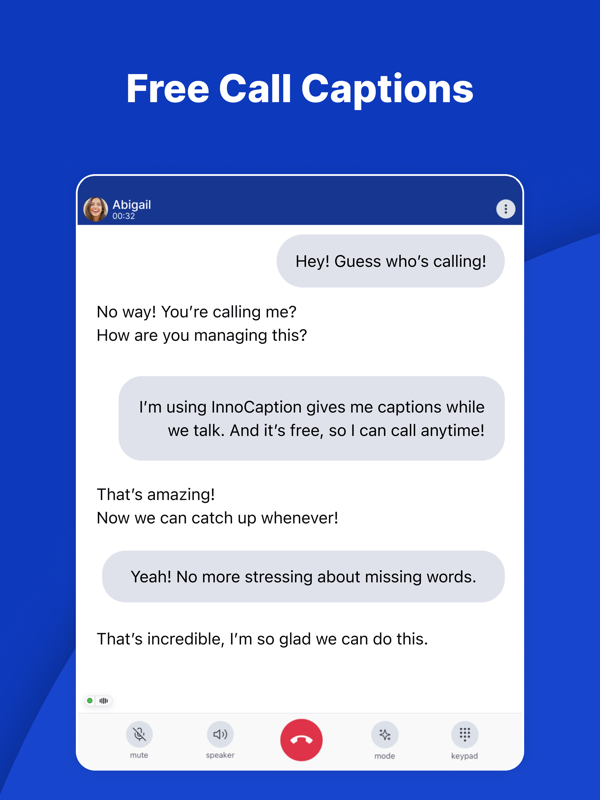
InnoCaption does one thing and does it beautifully: it captions your phone calls, free of charge, funded by the FCC's Telecommunications Relay Services Fund — with live stenographers, automatic captions, captioned voicemail, and your own phone number kept intact. If you have hearing loss in the US and you make phone calls, there's no reason not to have it.
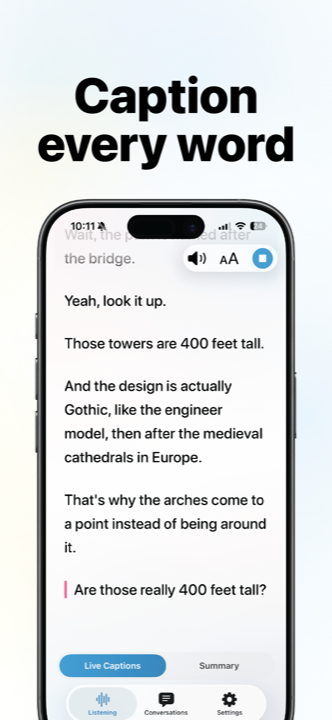
Hearing Buddy covers everything that happens when the phone isn't at your ear: the family dinner, the pharmacist's question, the coworker at your desk. Unlimited free captions for the world around you, processed entirely on your iPhone — no registration, no eligibility rules, no country restrictions.
Where InnoCaption ends — by its own rules
This isn't a gap we discovered; it's one InnoCaption openly documents. Because it's a certified telecommunications relay service reimbursed from a federal fund reserved for phone and video communication, its help center is explicit that the service can't be used when both people are in the same room — in their words (as of July 2026), "It is against the law to use the service as a substitute for hiring an in-person captioner to provide access." Permitted uses are remote only: phone calls, conference calls, online meetings, webinars.
That leaves every face-to-face conversation of your day uncovered — and that's precisely the job Hearing Buddy was built for. Open the app, tap the mic, and the room gets captions: unlimited, free, saved to your phone if you want them.
When it's a group, Caption Together captions everyone together: iPhones in the same room connect directly to each other, and each person's words appear by name in their own buddy color, merged into one timeline. No internet, no server, no account — and it's free.
No paperwork, no borders
InnoCaption's FCC funding is what makes it free — and it comes with FCC rules. Registration requires your name, birth date, home address, the last four digits of your Social Security number, and a self-certification of hearing loss. And the service is only available to users located in the United States, which leaves the international hard-of-hearing community without an equivalent.
Hearing Buddy has no forms and no borders. There's no account to create and nothing to qualify for; it works the same in Toronto, Tokyo, or Tucson. Because captions are generated on your iPhone rather than through a service, they keep working with no signal at all — basements, flights, rural dead zones.
Captions can also be translated live into 10 reading languages using language packs that run entirely on your phone. In a Caption Together room, each person reads the conversation in their own language — free.
A tap on the wrist
One thing no call-captioning service can offer: help in the room, in the moment. With Buddy+, your Apple Watch taps you when someone says your name or asks you a question — so you can stay present instead of watching a screen, afraid to miss your moment. No other captioning app has it.
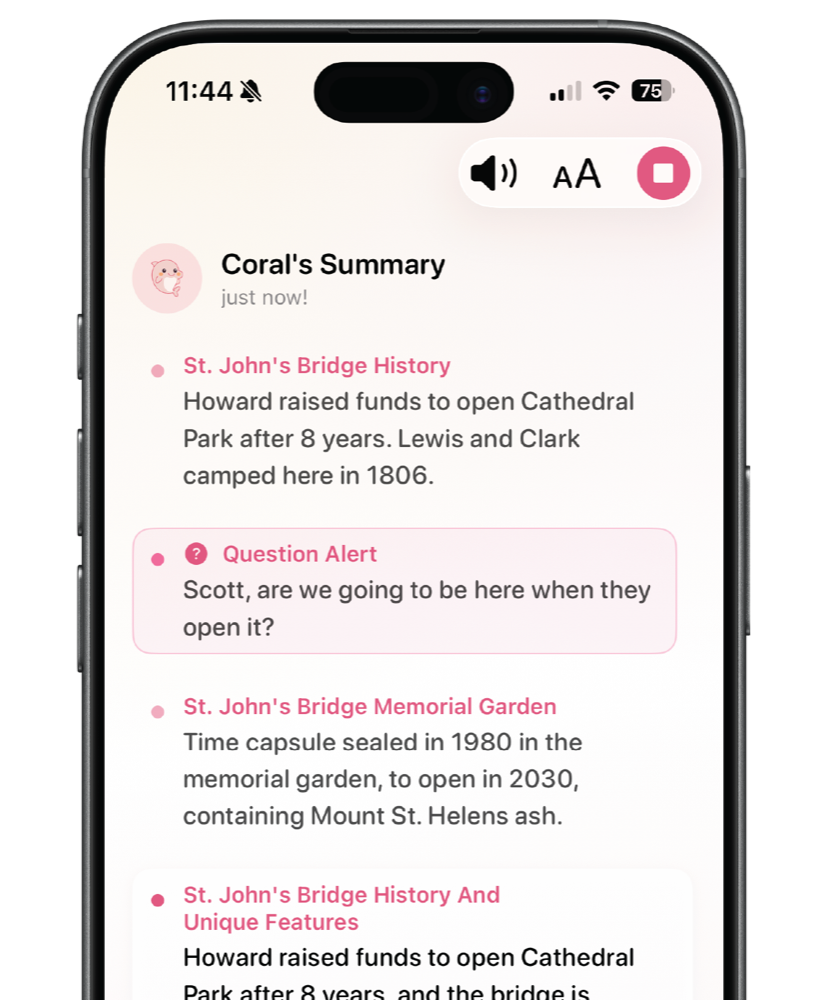
Buddy+ ($59.99/year, entirely optional) also adds conversation summaries — your Buddy catches you up on what a conversation is about when you join late — plus Speaker Labels, which use colors to tell up to four voices apart in solo sessions without training anyone's voice, and live translation for your solo captions. The captions themselves stay free, always.
When InnoCaption Is the Better Choice
Let's be direct: for phone calls, InnoCaption isn't just the better choice — it's the only choice between these two, and it's excellent. Here's where it wins outright:
Every phone call you make or take
iOS doesn't give microphone apps access to call audio, so Hearing Buddy simply cannot caption a phone call. InnoCaption captions them all — incoming and outgoing, with no call or duration limits — plus captioned voicemail and saved call transcripts, while its One Number technology lets you keep your existing phone number.
You want a human on the line
InnoCaption offers real-time captioning by live stenographers (CART), and you can switch between the human captioner and automatic captions at any point in a call. You can even add custom words — names, medical terms — to improve accuracy. We don't offer a human tier, and for high-stakes calls that layer matters.
Remote meetings, webinars, and conference calls
InnoCaption's permitted uses cover the whole remote world: conference calls, online meetings, and webinars, with captions built into the call itself. Mezmo Corporation also offers a separate InnoCaption Video app for captioned video calls. If your workday lives on the phone, this is your tool.
You're on Android or an older iPhone
InnoCaption runs on iOS 15.1+ and Android, phones and tablets alike. Hearing Buddy requires an iPhone on iOS 26 or later — if your device can't update that far, InnoCaption is free and ready today.
What You'll Actually Pay
- Unlimited real-time captions — free
- Caption Together group captions — free
- Background listening & transcript history — free
- Buddy+: $59.99/year
- Buddy+ adds Watch alerts, summaries, Speaker Labels, solo translation, and Buddy personalities
- Free with no call or duration limits
- Funded by the FCC's Telecommunications Relay Services (TRS) Fund
- Eligibility: US users with hearing loss; FCC-required registration
- Live stenographers and automatic captions both included
- No paid tiers — there's nothing to upsell you on
Details checked July 6, 2026 on innocaption.com and both apps' App Store listings. Rare and worth saying plainly: both of these apps are genuinely free.
Adding Hearing Buddy takes about a minute
This isn't a switch — nobody should give up free call captions. It's an addition: InnoCaption for the phone, Hearing Buddy for everything else.
Download free
No account, no email, no registration — the App Store is the only signup there is.
Tap the mic
Captions start instantly. No onboarding maze, no eligibility forms.
Keep InnoCaption
Seriously — use it for every call. Hearing Buddy picks up the moment you hang up and walk back into the room.

Questions & answers
Yes. InnoCaption is free for eligible users — people with hearing loss located in the United States — with no call or duration limits and no paid tiers. It's funded by the FCC's Telecommunications Relay Services (TRS) Fund, which is why registration and a hearing-loss self-certification are required. Hearing Buddy is also free (unlimited captions, with an optional $59.99/year Buddy+ tier for extras), so this is a rare comparison where both apps genuinely cost nothing.
No — and InnoCaption says so itself. Because it's a certified relay service funded by a federal program reserved for phone and video communication, its help center states it can't be used when both people are in the same room, calling such use "against the law" as a substitute for in-person captioning access (as of July 2026). Face-to-face conversations are exactly what Hearing Buddy is for: unlimited free captions for the room around you, processed on your iPhone.
No. InnoCaption's website states the service is only available to users located in the U.S., because its funding comes from the FCC's TRS Fund. Hearing Buddy works in any country — there's no registration or eligibility requirement, and since captions are generated on your iPhone, no local service infrastructure is needed.
No. iOS doesn't give microphone apps access to call audio, so no app like ours can caption a phone call — that requires a dedicated relay service like InnoCaption. If phone calls are part of your life, keep InnoCaption for them and use Hearing Buddy for the in-person conversations it can't cover.
They caption different parts of your day. InnoCaption captions remote communication — phone calls, conference calls, online meetings — through the FCC-funded relay system, with live stenographers or automatic captions. Hearing Buddy captions the physical world around you: face-to-face conversations, group discussions via Caption Together, with everything processed on your iPhone. One is for the phone, the other is for the room.
Yes. FCC rules require registration with your name, phone number, email, birth date, home address, the last four digits of your Social Security number, and a self-certification of hearing loss (as of July 2026). Hearing Buddy requires none of that — no account, no forms; download it and captions start.
The main InnoCaption app is built for phone calls, and Mezmo Corporation also offers a separate app, InnoCaption Video, for captioned video calls. Both cover remote conversations only — the in-person restriction applies across the service. For conversations happening in the room with you, that's Hearing Buddy's territory.
Honestly, yes — that's the setup we'd recommend to a friend. They don't overlap at all: InnoCaption for every phone call (free, FCC-funded, with human stenographers available), Hearing Buddy for everything that happens off the phone (unlimited free captions, Caption Together for groups, Apple Watch alerts). Both are free, so there's no tradeoff to agonize over.
Your calls are covered. Now caption the room.
InnoCaption handles the phone. Hearing Buddy handles everything else — unlimited free captions, no account, no paperwork, no strings.
Available on iPhone, Apple Watch, Mac & Vision Pro
InnoCaption is a trademark of Mezmo Corporation (dba InnoCaption). Hearing Buddy is independently made and is not affiliated with, sponsored by, or endorsed by Mezmo Corporation. All InnoCaption details on this page were verified on July 6, 2026 from innocaption.com, the InnoCaption help center, and the InnoCaption App Store listing; services change, so please confirm current details with InnoCaption. This page reflects our honest assessment — and honestly, if you make phone calls, we think you should have both apps.